Table-Based Systems
Planning is the first step in the application development process. As a system designer, you must consider how to store, retrieve, manipulate, and process data that is stored in the tables in your application database.
PeopleTools-based applications are table-based systems. A database for a PeopleTools application contains three major sets of tables:
-
System Catalog tables store physical attributes of tables and views, which your database management system uses to optimize performance.
-
PeopleTools tables contain information that you define using PeopleTools.
-
Application Data tables house the actual data that your users enter and access through PeopleSoft application pages.
This diagram shows PeopleSoft database tables and sample names:
The following image explains about the different tables in a PeopleSoft database
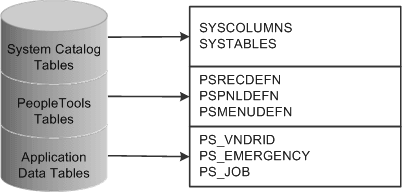
Like a spreadsheet, each of these tables contains columns and rows. Columns define the structure of how the data is stored. Rows represent the actual data that is stored in the database.
Every time that you create a new definition using PeopleTools, the system inserts rows of data into various PeopleTools tables. The entries in these tables determine the online processing of the system and what happens during imports. PeopleSoft maintains the structure of these tables. You maintain data in the PeopleTools tables related to definitions that you create or adapt using PeopleTools. You can view the PeopleTools tables in the PPLTOOLS project using the PeopleSoft Application Designer.
To create the application data tables that store the rows of data that your users manipulate:
-
Create a record definition.
In doing so you determine the structure of the table, the characteristics of the fields, and any online processing that you want to occur behind the scenes when a user enters data.
-
Apply the SQL Create option to build the SQL table in which your application data will reside based on a subset of parameters in your record definition.
During this process, the system automatically gives the application data table the same name as your record definition, prefaced with PS_.