Understanding Change Control Information Reporting
Currently, no predefined reports for retrieving Change Control information are available. However, you can create your own reports by querying the Change Control tables.
The two tables that you can use for reporting are the Change Control History table (PSCHGCTLHIST) and the Change Control Locking table (PSCHGCTLLOCK). These tables have an almost identical column structure:
This example illustrates the fields and controls on the Structure of PSCHGCTLHIST. You can find definitions for the fields and controls later on this page.
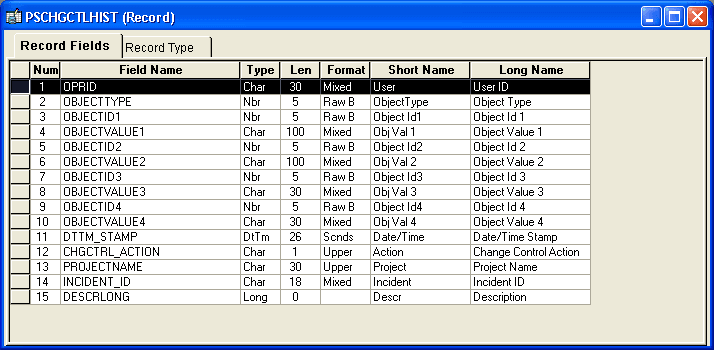
The main difference between these two tables is that PSCHGCTLHIST contains a CHGCTRL_ACTION field, while PSCHGCTLLOCK does not.
Each PeopleSoft definition in these tables is uniquely identified by numeric codes (DEFINITIONID columns) and names (DEFINITIONVALUE columns). The different DEFINITIONID and DEFINITIONVALUE column pairs correspond to the various definition key types and values for each kind of definition. You can see these definition keys when you view the upgrade definition window. For example, translate values have these keys—Field Name, Field Value, and Effective Date, as in this example:
This example illustrates the fields and controls on the Viewing definition keys. You can find definitions for the fields and controls later on this page.
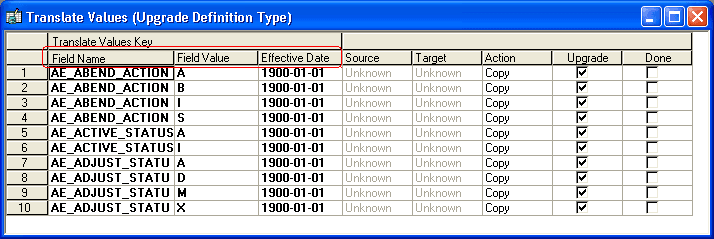
In the Change Control tables, the row containing the first translate value in the preceding example has the following field values:
| DEFINITIONVALUE1 | DEFINITIONVALUE2 | DEFINITIONVALUE3 |
|---|---|---|
|
AE_ABEND_ACTION |
A |
1900-01-01 |
When reporting on a particular definition type, you want to retrieve definition values, but you must limit the query by using the definition IDs for the definition type. The following tables list all of the upgradable definition types, their corresponding definition ID codes, and the type of value that each ID represents (in parentheses).