Understanding the Create Table Process
The Build process generates the appropriate SQL Create statements to build tables based on both your record definition and your platform. It prefaces each new application SQL table with PS_ to identify it as an application that was built using PeopleTools. For example:
PS_ABSENCE_HISTNote:
PeopleTools does not preface table names with PS_ if you specified a custom name in the Non-Standard SQL Table Name edit box located on the Type tab of the Record Properties dialog box.
The Build process also creates the appropriate indexes. Because long-character fields operate more efficiently in some database environments when they are located at the end of a table, the Build process automatically positions long-character fields at the end of the table for each database environment.
The Create Table process creates a new application table based on parameters defined in the record definition. When a new table is created, the database management system updates the system catalog tables to reflect the attributes of the new table.
The Create Table process is illustrated by the following diagram:
The following diagram illustrates the process of Create Table that creates a new application table based on the parameters defined in the record definition
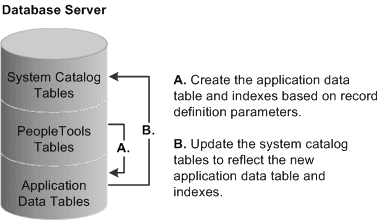
After you create an updated SQL build script and run it, the PeopleTools tables and the system catalog tables are synchronized; and the record definition and the application data table are synchronized. The following table lists the steps of the Create Table process and the associated record definition parameters:
| Create Table Process | Record Definition Parameter | Usage |
|---|---|---|
|
Drop the table if it already exists. |
NA |
NA |
|
Create the application data table. |
Record definition name. Field names. Field type. Field length. |
Table name (add PS_ prefix). Column names. Column type. Column length. |
|
Create indexes. |
Key fields. Alternate search key fields. Custom indexes. |
Unique index: (_) Alternate index: 10 (0–9) per table. Custom index: (A–V) per table. |
The following procedure covers all of the high-level steps that you need to successfully complete for the Create Table build process. Steps that involve a variety of options include links to the area where those options appear in this product documentation.
Note:
You can have a maximum of 500 columns per table.