Understanding HTML Area Controls
You can insert an HTML area control on any PeopleSoft page. You can insert it at any level on a page, and you can place it in a grid control. This control is rectangular and is easy to resize.
Populate the HTML area control in one of these ways:
-
Statically, in the page field property sheet.
-
Dynamically, by associating the control with a record field or HTML definition.
If the control is linked to a record field, the value of the record field appears in the HTML area. Use PeopleCode to associate the HTML area control with a predefined HTML definition.
When using HTML areas, consider:
-
HTML areas are downloaded to Microsoft Excel as a non-breaking space ( ).
-
HTML areas are not searched with the Find feature.
Generating Trees in HTML Areas
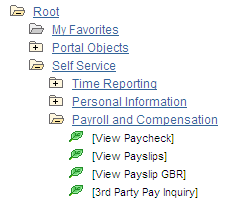
You can use the GenerateTree PeopleCode function with HTML areas. This example shows the tree that is created by the GenerateTree PeopleCode function on the Select New Parent Folder page:
This example illustrates the fields and controls on the Example of a tree in an HTML area. You can find definitions for the fields and controls later on this page.
Populating HTML Areas
You can populate an HTML area either statically, using the HTML Area Properties dialog box, or dynamically, by associating the control with a record field. Because the HTML that you write is included in the HTML that is dynamically generated by the system at runtime, consider the following:
-
The HTML that you include can affect the page layout.
Complying with the design-time sizing of the HTML area is the best way to ensure that you do not affect the layout of the other page field controls. Adding an invisible frame around the HTML area control can help ensure that you do not affect other page fields.
-
You can use only certain types of HTML tags. These tags are not supported by the HTML area control:
-
<body>
-
<frame>
-
<frameset>
-
<form>
-
<head>
-
<html>
-
<meta>
-
<title>
-
Using JavaScript in HTML Areas
When using an HTML area field for adding JavaScript, make sure that JavaScript code is added only once per page. It should not be added in multiple places on a single page unnecessarily. This improves browser performance, especially for display on mobile devices.
Using Rich Text Editor-Generated HTML in an HTML Area
When you use the rich
text editor to generate HTML that appears in an HTML area page control,
you must call the ProcessRTEHTML function to process the rich text editor-generated
HTML before you assign it to the HTML area. The ProcessRTEHTML function wraps the HTML inside a <div> element,
sets the style class to PT_RTE_DISPLAYONLY, and attaches the image
processing JavaScript. Use the following code as an example:
Declare Function ProcessRTEHTML PeopleCode WEBLIB_PTRTE.ISCRIPT1 FieldFormula;

&HTMLAAREA.value = ProcessRTEHTML ("URL ID of the image target", "HTML Data To be⇒
 Processed");
Your code might look like this:
&HTMLAAREA.value = ProcessRTEHTML (URL.PT_RTE_IMG_DB_LOC, "<p>example</p>");The &HTMLAAREA.value should be similar to this:
<div id="RTEDiv188" class="PT_RTE_DISPLAYONLY">
  <p>example</p>
     <script type="text/javascript" language="JavaScript">
          PTRTE_CheckImages("", "PT_RTE_IMG_DB_LOC", "RTEDiv188");
     </script>
</div>
Using HTML Areas in AJAX Mode
Note the following code restrictions in HTML areas when running the application in AJAX mode:
-
Do not include XML tags, such as
CDATA. -
Do not include empty or commented out
<script>elements. -
Do not include
document.writeas part of the HTML in an HTML area.
Using HTML Areas in Grids or Scroll Areas
If HTML area fields are used in a grid or in a scroll area, they can cause performance degradation if there are more than 50 rows in the grid or in the scroll area, or if there are many HTML area fields in the grid or in the scroll area. This is due to the behavior of partial page refresh. During a partial page refresh, the system cannot determine what has been changed within the fields of an HTML area, so all fields in an HTML area are refreshed, regardless, which can hamper performance.