Understanding Pop-up Menus
Pop-up menus are an Application Designer definition that consists of one or more items, referred to as links. While the Application Designer definition is referred to as a “pop-up menu” the items are rendered as links, and not as a menu, at runtime. These links can be defined to either perform a definitional transfer or to execute a PeopleCode program.
-
A definitional transfer is distinguished from transfers that are made using PeopleCode programs—for example, modal transfers. Definitional transfers always replace the current page in the current window. To perform a modal transfer, you must use PeopleCode.
-
PeopleCode for links in pop-up menus does not share the same limitations as PeopleCode in standard menus, so pop-up menus provide an effective alternative to using command push buttons on pages. Pop-up menu PeopleCode programs can be used for any number of purposes, for example:
-
To perform a modal transfer.
-
To recalculate a field value.
-
To trigger a PeopleSoft Workflow business event.
-
Pop-up Links at Runtime
This example illustrates pop-up links next to the View Other Links button.
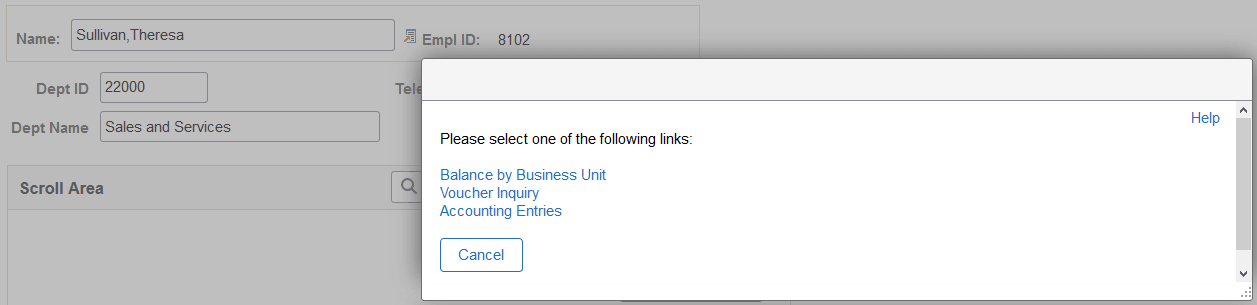
These standard icons appear on the page at runtime when a pop-up menu is associated with a page field:
| Term | Definition |
|---|---|
|
|
Click the View Other Links button to open a modal window where you can select from among the links listed. Note: This icon appears if the pop-up links consist of more than one item. |
|
|
Click this button, labeled with the name of the single link, to execute the action of the link directly. Note: This icon appears if the pop-up links consist of only one item. |


Related Topics