Understanding Record Key Considerations
When creating key fields in your record definition, keep in mind several guidelines that are discussed in the following topics.
Records With Multiple Keys
You can specify more than one field as a key to a record definition; that is, a record definition can have a compound key. This example shows a compound key structure:
This example illustrates the fields and controls on the Example of a compound key structure in the PO_LINE record definition.
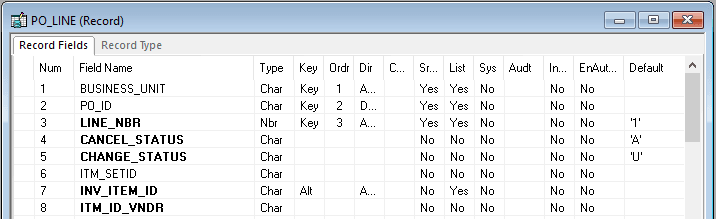
The keys to the PO_LINE record definition are BUSINESS_UNIT, PO_ID, and LINE_NBR. Therefore, each purchase order must be unique to a business unit, and each line item in a purchase order must have a unique number.
Keys in Parent and Child Tables
In some cases, you have a field in a table for which you want to allow multiple occurrences, in which case you create a subordinate or child table. For example, for employee reviews, an employee can be reviewed for performance in multiple categories—organization skills, interpersonal skills, and so on. These categories and ratings are stored in a separate child table, EE_REVIEW_RT, which is directly related to REVIEW_DT, the parent table that stores information about employee reviews.
The keys that you establish in a parent record definition determine which keys are required in child record definitions. The child must have the same keys as the parent, plus one or more keys that uniquely identify each row:
| Item | Parent Table | Child Table |
|---|---|---|
|
Record Definition |
REVIEW_DT |
EE_REVIEW_RT |
|
Key Fields |
EMPLID REVIEW_DT |
EMPLID REVIEW_DT CATEGORY |
Most record definitions have either one primary key, or multiple keys that comprise independent, or parent and child key combinations. Exceptions exist, however, such as record definitions without keys and duplicate order keys.
Records Without Keys
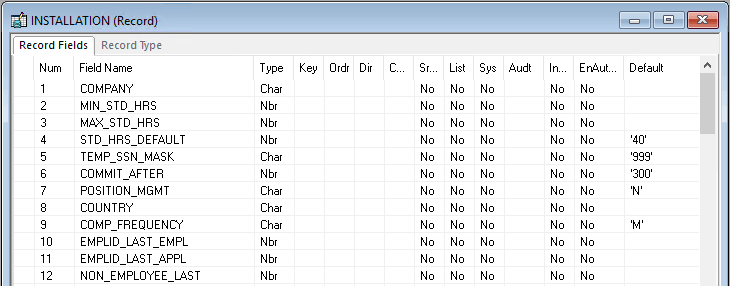
Some record definitions, such as INSTALLATION, do not require keys because only one row of data exists in the table. Whereas a table normally has keys to help distinguish between multiple occurrences of data, when a table has only one row of data you do not need to distinguish one row from another. Another primary use for keys is to build database indexes to rows; because each table has only one row, the record does not need indexes. This example shows a record definition with no defined key structure:
This example illustrates the fields and controls on the INSTALLATION table: example of record definition with no defined key structure.
Records With Duplicate Order Keys
Occasionally, you might encounter situations in which a unique identifier for each row does not exist. Duplicate order keys are a way of ordering data in the table when duplicate values are allowed.
For example, in the EDUCATION table, PeopleSoft developers anticipated that an employee can receive two degrees of the same type on the same date. For example, though rare, Simon Schumaker could receive two honorary degrees in computer science on the same day. Because no unique identifier exists—the employee ID, date earned, and degree are all the same—the user must maintain the data differently. The key, instead of defining a unique row, defines a group of rows. In that group, you must determine the order in which you want to display the information.
In the EDUCATION record definition, three keys together determine how information is stored and retrieved. EMPLID identifies the group of rows; and the placement of the duplicate order keys, DT_EARNED and DEGREE, instructs the system to order rows in the group first by date and then by degree:
| EMPLID | DT_EARNED | DEGREE |
|---|---|---|
|
8001 |
June 1, 1992 June 1, 1992 |
HON HON |
The system concatenates or joins keys when it checks for uniqueness. In this case, the system accepts duplicate entries in the DEGREE and DT_EARNED fields because they are part of a set that is identified by EMPLID.
Note:
Records with duplicate order keys should not have related language tables associated to them. If the record requires a related language record, you must remove the order keys. Do not create a related language record with a duplicate order key.
Note:
If you intend to perform data integrity validation on your record data when the system performs a save, don't use duplicate order keys on your record. With duplicate order keys, the system cannot ensure a unique row of data for validation.
Note:
If you create a duplicate order key on a record, you see a warning message when you save the record. During runtime, there is more information written to the log file. Use the Set Trace Flags option Component Buffers Before Save, and search for more information in the log file.
Ordering Keys
The position of keys relative to one another is critical in a record definition; always list them in order of importance. The primary key must be the first field in the record, followed by the next most important key, and so on.
Key fields are followed by duplicate order keys, in order of importance, and then by fields that are not keys. You can scatter alternate key fields anywhere among regular fields, in any order. They do not need to be grouped.
Key, Duplicate Order Key, and Alternate Search Key are mutually exclusive.
Note:
The display of key fields in record definition views does not always match the order in the record. Always check the Num column to see the actual order.
Each alternate search key that you configure creates a database index when the SQL creates the table. While database indexes are important, they consume disk space and, when the system must support the alternate key, processing time. Therefore, do not add alternate search keys unless you really need them.
For both records and subrecords, you can only add 10 alternate search keys.