Working with Materialized Views
When building SQL views or query views on an Oracle database, you have the option of implementing a materialized view.
A materialized view acts as a database table that contains the results of a query. Once created, the data in a materialized view can be synchronized (automatically or manually) with its source information as needed with little or no programming effort.
A view has a logical existence, but a materialized view has a physical existence. All the characteristics and tasks that can be performed with a table can also be done with a materialized view. For example, a materialized view can be indexed, analyzed, and so on.
Materialized views are discussed in more detail in the product documentation forPeopleTools: Data Management. See Data Management: Using Materialized Views.
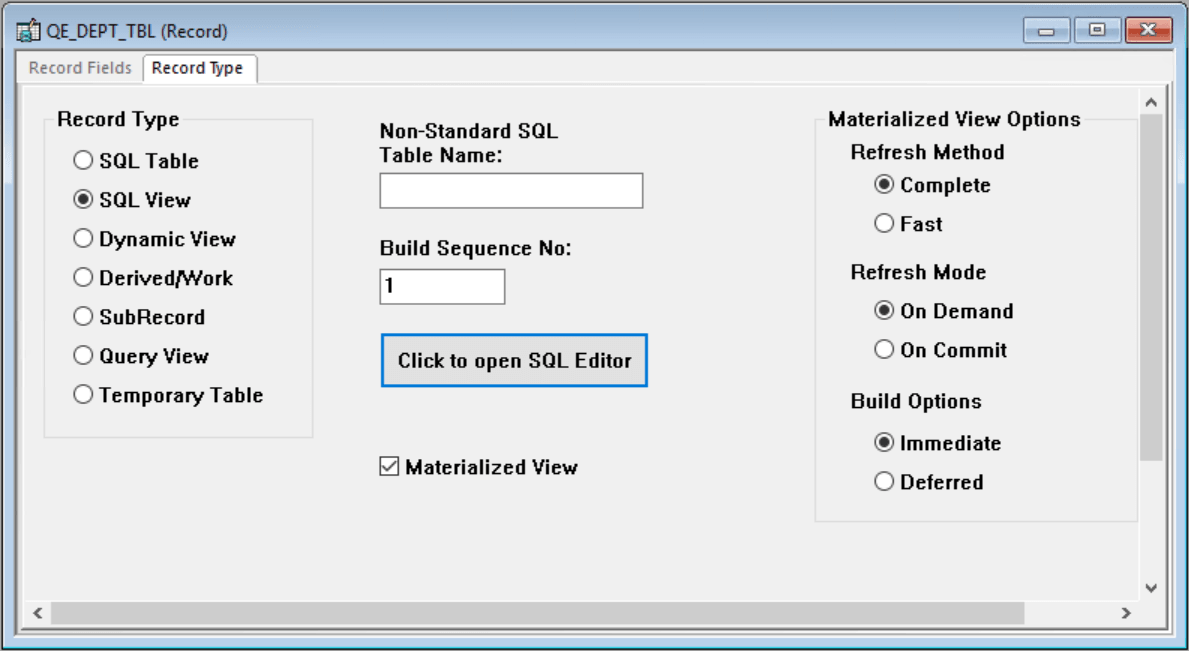
This example shows the Record Type tab when creating an SQL view on the Oracle platform with the Materialized View option.
| Term | Definition |
|---|---|
|
Materialized View |
Select to create a materialized view for Oracle database systems when SQL View or Query View is also selected. This option is available only for Oracle systems. When selected, the Materialized View Options group box appears to the right. |
Materialized View Options
| Term | Definition |
|---|---|
|
Refresh Method |
Complete: The materialized view table will be refreshed completely. (Default) Fast: The materialized view table will be refreshed incrementally when running the Application Designer Build option. |
|
Refresh Mode |
On Demand: Administrators refresh the view through Materialized View Maintenance page. (Default) On Commit: During a commit, the Oracle system executes triggers and updates the materialized view log tables. |
|
Build Options |
Immediate: The system creates the view and populates the view from the base tables. This may be time consuming depending upon the complexity of the view and data. (Default) Deferred: The system creates the view but does not populate the view during the build process. An administrator must run a refresh from the Materialized View Maintenance page. |
Materialized views are discussed in more detail in PeopleTools: Data Management. See Data Management: Using Materialized Views.
Similar options exist for IBM Db2 for z/OS (Materialized Query Tables) and Microsoft SQL Server (Indexed Views).