Assigning Temporary Tables to Programs
Open an Application Engine program in Application Designer. Select File, Definition Properties and then select the Temp Tables tab.
This screenshot illustrates the fields and controls on the Program Properties dialog box: Temp Tables tab.
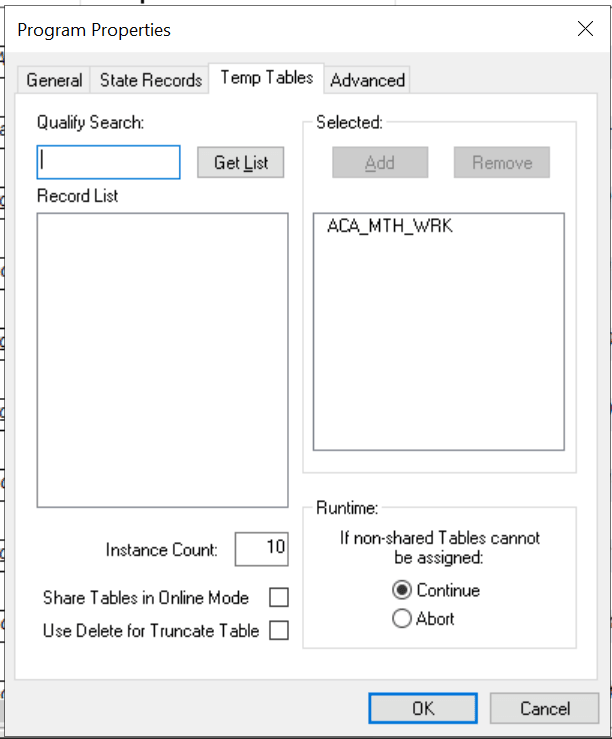
In the Record List box, include all the necessary temporary table records for this program.
In the Instance Count field, specify the number of copies of temporary tables for a program. Any time you change the instance count, you should rebuild the temporary tables to ensure that the correct number of instances is created and available for your programs.
Share Tables in Online Mode has to be selected if the online Application Engine program needs to share the temporary table instances.
If an Application Engine program is currently sharing the temporary table instances , deselect the Share Tables in Online Mode to make the program use dedicated temporary tables. With Share Tables in Online Mode disabled, any temporary table instance can be accessed by only one online process at a time. In case no temporary table instances are available for an online Application Engine process, the process has to wait until one of the temporary table instance is released by other processes.
Use Delete for Truncate Tableclears the temporary table by performing delete during Application Engine process.
Note:
The concept of dedicated temporary tables is isolated to the Application Engine program run. The locking, truncate/delete from, and unlocking actions are designed to occur within the bounds of an Application Engine program run. Therefore, the system does not keep a temporary table instance available after the Application Engine program run is over.
Runtime Allocation of Temporary Tables
Online processes have their own set of dedicated temporary tables, defined globally on the PeopleTools Options page. When you invoke a process online, PeopleTools randomly allocates a single temporary table instance number to a program for all its dedicated temporary table needs. While the program runs, no other program can use that instance number. Any other online process that happens to get the same instance value waits for the first program to finish so that the instance number is unlocked.
In contrast, batch processes are allocated temporary table instances on a record-by-record basis. The system begins with the lowest instance number available for each temporary table until all of the temporary table instances are in use. If no temporary tables are available and you selected Continue for theIf non-shared Tables cannot be assigned group box, then the base table is used, with the process instance number as a key.
When a program ends normally or is cancelled with Process Monitor, the system automatically releases the assigned instances.
| Condition | Online | Batch |
|---|---|---|
|
Temporary tables are allocated using meta-SQL. |
%Table(temp-tbl) |
%Table(temp-tbl) |
|
Temporary tables are allocated at runtime. |
Psae.exe randomly assigns an instance number from the number range on your online temporary table setting on the PeopleTools Options page. Psae.exe uses that number for all tables for that program run. |
Individually allocates an instance number based on availability on a record-by-record basis. Psae.exe begins with the lowest instance number available for each temporary table, until all of the instances are in use. |
|
No temporary tables are free. |
For a particular record, if the instance is currently in use and the program is set to Continue, then the psae.exe queues the program until the assigned instance number becomes free. |
If the program is set to Continue, the system uses a shared base table. If the program is set to Abort, then the system terminates the program. Never queues for a table. |
|
A temporary table is initially clear. |
Yes, when program instance becomes available. |
Yes, when assigned. |
|
An instance number is locked. |
The lock is on when the program is loading into memory. |
The lock is on when the program is loading into memory. For restartable programs, the temporary tables remain locked across restarts until the program has completed successfully or until the temporary tables are manually released using Process Monitor or the Manage Abends page. |
|
An instance number is unlocked. |
Temp tables unlocked on completion of program. In the event of a kill or a crash, the tables remain locked, and the tables must be freed using Process Monitor or the Manage Abends page. |
If restart is disabled, the temporary tables are unassigned automatically in the event of a controlled abnormal termination. If you cancel a process using Process Monitor, PeopleTools frees the temporary tables automatically. When you use the Manage Abends page, you must click the Temp Tables button corresponding to the correct process instance, and then click theRelease button on the Temporary Tables tab of the Application Engine program properties. |
Note:
After you manually release the temporary tables from their locked state, you lose any option to restart the program run.
Sharing Temporary Table Data
Dedicated temporary tables do not remain locked across process instances. If sequential Application Engine programs need to share data by way of temporary tables, a parent Application Engine program should call the programs that share data.