Configuring Performance Data Collection
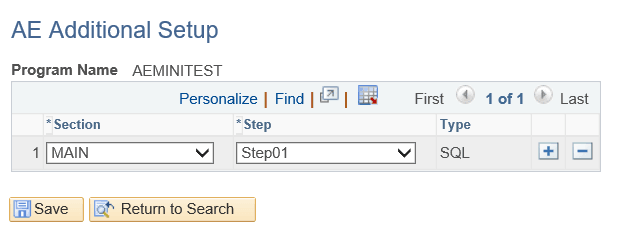
You can configure performance data collection of a specific SQL action using the AE Additional Setup page.
To configure performance data collection:
-
Navigate to PeopleTools, Application Engine, AE Enhanced Performance Trace.
-
Search for the Application Engine program.
-
On the AE Additional Setup page, enter the configuration detail, such as the section and step name of the specific SQL action.
Note:
Other action types, such as PeopleCode, will not be displayed on this page as you can only collect performance data for SQL actions.
The example below illustrates the configuration detail to capture performance data of a specific SQL action:
As part of performance data collection, a new table PSAESQLTIMINGS gets created to store performance data for specific SQL actions. The table includes Application Engine process instance, run control ID, rows affected, start time, end time, and SQLID.
Note:
Performance data of SQL actions will be inserted in the PSAESQLTIMINGS table when the Application Engine ends successfully.
You can use the SQLID data to query the database system table to get further information. SQLID data is available only for Oracle databases.
Related Topics