Setting Action Properties
To modify action properties, the Definition view must be active. Because you can include a variety of actions within a step, different sets of properties are specific to particular action types. Depending on the action type you select, the properties that appear will change.
For example, you can specify the reuse feature with a SQL action. This feature does not apply to a PeopleCode action; instead, you would need to specify how to respond to the return value of the PeopleCode program.
This example illustrates the fields and controls on the Actions and their associated properties.
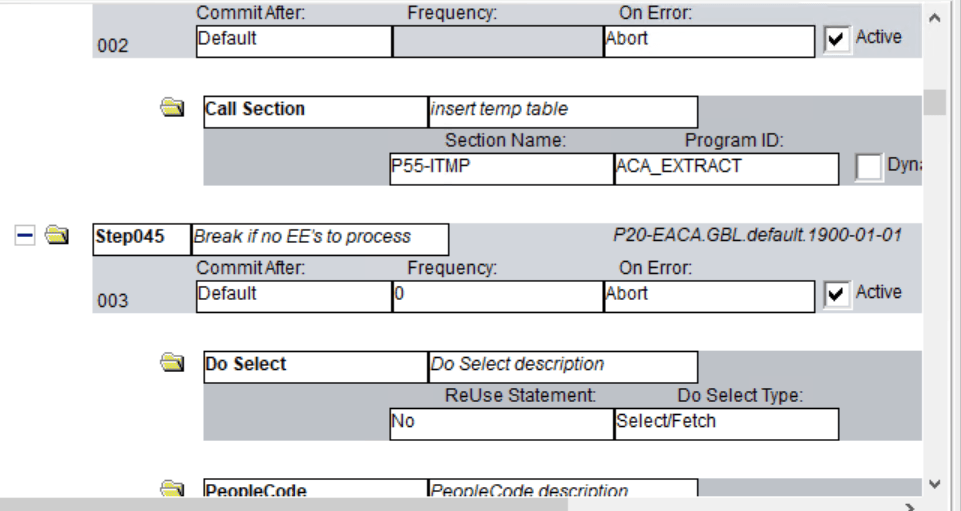
PeopleCode and all SQL action types invoke the related PeopleTools Editor to define or maintain the related text.
ReUse Statement Property
The ReUse Statement property is available for all SQL action types (SQL, Do When, Do While, Do Until, Do Select). You use the ReUse Statement property to optimize the SQL in your batch program. A ReUse Statement converts any %BIND references to state record fields into real bind variables (:1, :2, and so on), enabling the Application Engine runtime process to compile the statement once, dedicate a cursor, and then run it again with new data as often as your program requires. When you use SQL or a Do action to process a large volume of rows one at a time, inside a fetch loop, compiling each statement that you issue can affect performance significantly. ReUse Statement is a way to combat possible performance slowdowns.
Note:
You can have Application Engine recompile a reused statement by using the %ClearCursor function.
When setting the ReUse Statement option, choose from these values:
| Field or Control | Description |
|---|---|
|
Bulk Insert |
When used in conjunction
with statements like |
|
No |
Select this option to disable a ReUse Statement. With ReUse deselected, the Application Engine runtime process recompiles the SQL statement every time the loop runs. By default, a ReUse Statement is disabled. |
|
Yes |
Select this option to enable basic ReUse Statement functionality. |
Note:
The ReUse Statement property can improve performance significantly. However, do not use it if %BIND variables are building parts of the SQL statement or are in the field list of a Select statement (this note does not apply if you use the Static option in %BIND).