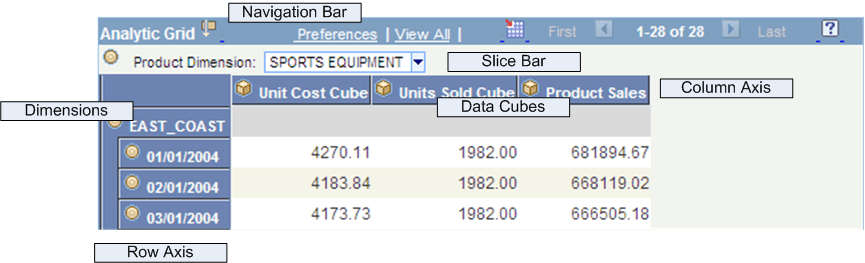
Understanding Analytic Grids
Analytic grids are specific to PeopleSoft Analytic Calculation Engine, which is the PeopleSoft multidimensional reporting tool. Within PeopleSoft Analytic Calculation Engine, analytic models define the rules for calculating data. Analytic models consist of data cubes and dimensions. Data cubes are categories of data; you create one for each kind of information in your analytic model; for example, one for sales, one for rent, and one for salary. Dimensions are a list of one kind of data that can span various contexts; for example, months or product codes. You organize data cubes and dimensions into cube collections. Single members of data cubes or dimensions—such as one month—are known as members.
When the analytic grid is in Freeze Column mode, you can load into it data that does not come from the Analytic Calculation Engine.
PeopleSoft Pure Internet Architecture pages containing analytic grids display data from cube collections. You can use the analytic grid to edit data, pivot data cubes and dimensions (you move them between the row and column axis of the grid) to gain a different view of data, and view selected slices of data. Within an analytic grid, you can expand and collapse dimensions with a hierarchical structure; you can also drill down into such dimensions. Finally, you can modify preferences within an analytic grid and then save a particular layout that you have created or return to the default grid layout.
See Analytic Calculation Engine.
This example illustrates the components of an analytic grid.