Understanding Page Personalization
The page personalization feature helps you tailor your transactions to specific business processes and to your personal data entry style. The Personalize Page option in the pagebar located just below the navigation header is available for most PeopleSoft pages.
Note:
Page personalizations may be superseded if the order of the grids in the underlying page definition is changed in Application Designer.
This example shows the pagebar.

Select the Personalize Page link to open the Page Personalization page for the current page.
This example illustrates the fields and controls on the Page Personalization page.
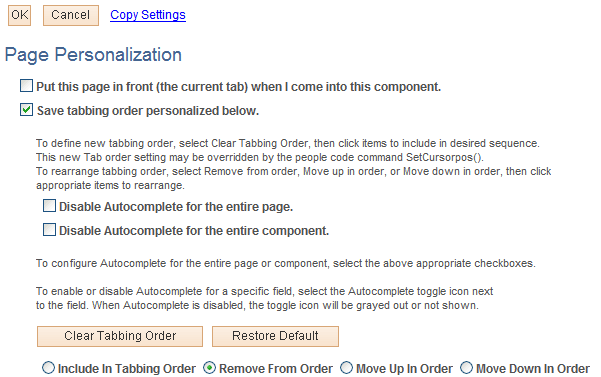
This example illustrates the fields and controls on the Page Personalization page.
Note:
Your system administrator can disable the page personalization feature. Disabling this feature may be necessary if your company is concerned about database growth.