Understanding the Rich Text Editor
The rich text editor extends the capability of a long edit box. It allows for the rich formatting of text content, including common structural treatments such as lists, formatting treatments such as bold and italic text, and drag-and-drop inclusion and image sizing. You use the rich text editor toolbar to apply additional formatting elements. The toolbar is extensible by means of a custom settings configuration file that application developers can create and implement. See Application Designer Developer’s Guide: Modifying the Rich Text Editor User Interface.
Important:
PeopleTools 8.61 and later versions render the rich text editor based on CKEditor v5, which does not include many features that were supported in CKEditor v4. See Application Designer Developer’s Guide: CKEditor v4 Features Desupported in CKEditor v5 for more information.
To stay current with the latest information, subscribe to the following technical bulletin on My Oracle Support: Data Compatibility with Updated Rich Text Editor Technology in PeopleTools (Doc ID 2945233.1).
Note:
All rich text-enabled fields support multi-language entry.
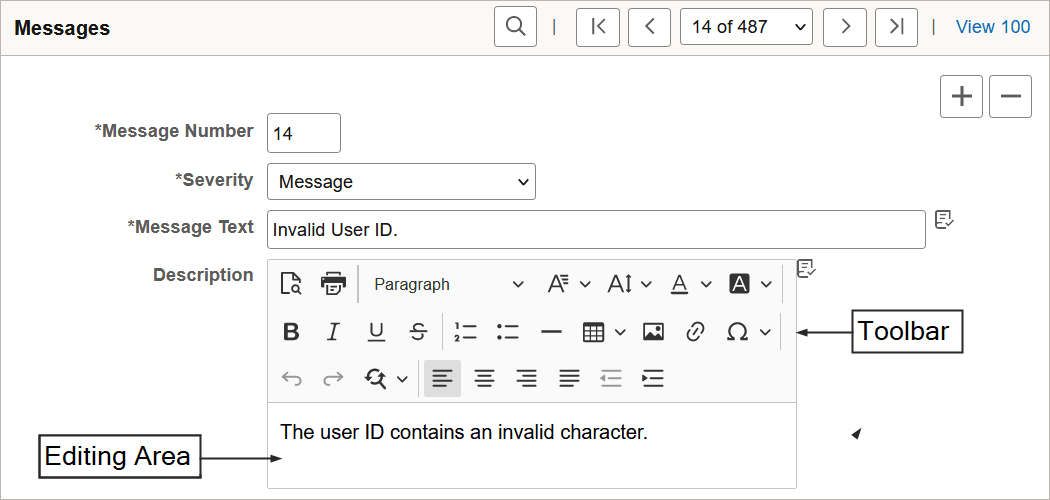
The rich text editor provides an easy to use interface which should be familiar to users who work with common text editors such as Microsoft Word or Oracle Open Office. It consists of these distinct elements:
-
Toolbar
-
Editing area
The Messages scroll area contains an example of the rich text editor control showing the toolbar and editing area elements:
This example shows the rich text editor controls.
Toolbar
The toolbar, which is the area at the top of the editor, contains many different buttons that extend and activate a variety of editor functions. The toolbar is highly personalizable and can vary from field to field.
See Application Designer Developer’s Guide: CKEditor v4 Features Desupported in CKEditor v5.
Editing Area
The editing area is directly below the toolbar. You enter text in this area.
Limitations
Note the following limitations for using the rich text editor:
-
The PeopleTools SVG Administrator role is required to be able to upload SVG images via the rich text editor.
-
When the Source button is enabled, <script> tags are not allowed in rich text editor content. If you include a <script> tag, then the entire content will be converted to text, including all HTML tags.
-
When the Source button is enabled, you cannot include <link> tags—for example, to reference style sheets.
Related Topics