Using the My Dictionary Page
Use the My Dictionary page to maintain a personal dictionary of spell check words by language.
Navigation:
This example illustrates the fields and controls on the My Dictionary page. You can find definitions for these options in this section.
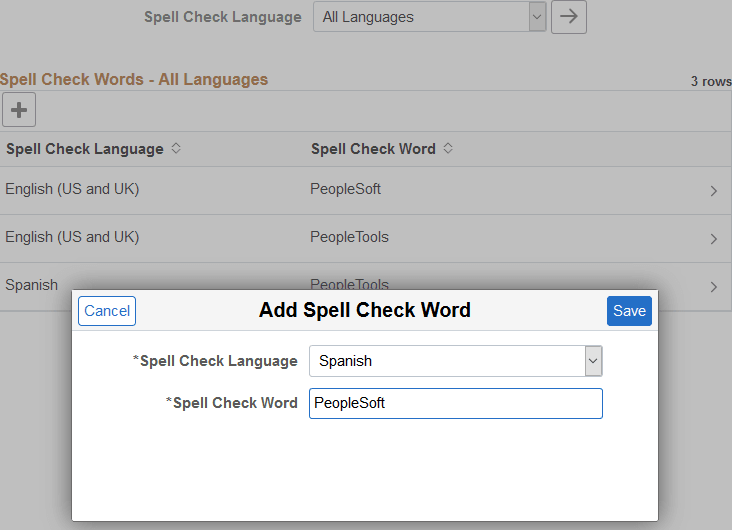
As you use spell check, you might need to add certain words or acronyms to your personal dictionary so that spell check does not continually attempt to correct them. You can add these words by clicking the Add button while you are spell checking or you can add several at once by using the My Dictionary page. This page enables you to add, update, and delete words by language. The words that you enter in your personal dictionary are attached to your user ID, so your personal dictionary is available to you no matter where you access it.
Note:
The maximum number of words in the personal dictionary is 2882.
| Field or Control | Description |
|---|---|
|
Spell Check Language |
Select the language to display in the grid. Note: Select All Languages to display all of the entries in your personal dictionary. |
|
|
Click the Apply Language button to update the grid based on the currently selected language. |
|
|
Click the Add Word button to add a new word to your spell check dictionary. Note: When the grid is empty, the Add Word button appears with those words as a label, and not as a + sign. |

 (or
(or Spell Check Words - Selected Language
| Field or Control | Description |
|---|---|
|
Spell Check Language |
The spell check language selected for this word. |
|
Spell Check Word |
The word entered in your dictionary. Click the row in the grid to update the entry. You can change the spell check language, change the word, or delete the entry entirely. |
Add Spell Check Word Page
| Field or Control | Description |
|---|---|
|
Spell Check Language |
Select the language to which you want to add the word. To enter the same word in multiple languages, make a separate entry for each language. After saving a new word, the page and grid are refreshed to show only words entered in this selected language. |
|
Spell Check Word |
Enter the word or abbreviation that you want added to your personal dictionary. Entries must be 40 characters or less. |
The words that you add to your personal dictionary are case sensitive. The case determines how spell check validates correct spelling. The system applies the following case-sensitive rules:
-
If the added word is all lowercase, such as worklist, then the following rules are valid:
-
Exact match, all lowercase (worklist).
-
All uppercase (WORKLIST).
-
Initial capitals (Worklist), regardless of the position of the word in the sentence.
Mixed case (WorkList) is incorrect.
-
-
If the added word is all uppercase, such as CRM, then only an exact match is valid. Lowercase and mixed case are not valid.
-
If the added word is in initial capitals, such as California, then only an exact match (California) and all uppercase (CALIFORNIA) are valid.
-
If the added word contains an embedded capital letter, such as PeopleSoft, then only an exact match is valid.
-
If case is not relevant to the validity of the word, then enter the word into your dictionary in all lowercase.