Embedding PCL Code into Template
You can embed custom Printer Command Language (PCL) code to enable font selection for secure check printing (that is, to invoke the MICR font used for bank account codes and the check’s secure signature fonts). To embed PCL commands in the file that is printed, use the BI Publisher commands described below in your RTF template in the specific position on the page where you want the PCL commands to render.
RTF templates can be created with PCL hardcoded lines, which means that a user can directly specify the exact PCL command to be included at a specific visual position on a PCL page.
In the template, include the following syntax at the position where you want to print the text.
<pcl><control><esc/>(pcl command)</control>(text or data field)<sp/>
(text or data field)</pcl>
where:
<pcl></pcl>: indicates the start and end of the custom PCL command sequence and the text to print using the custom command.
<control></control>: indicates the start and end of the PCL sequence.
<esc/>: include <esc/> between <control> and </control> to escape character (ASCII 0x1b) in the output.
<sp/>: inserts a space.
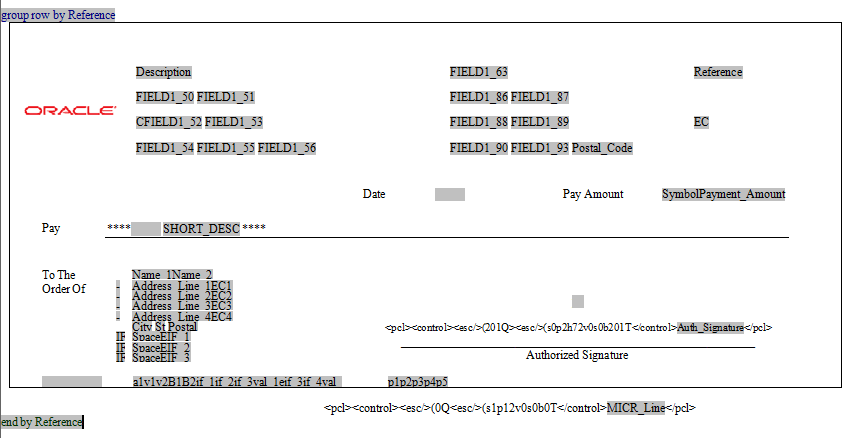
This example illustrates the PCL command sequence in a RTF template.
RTF template with embedded PCL code
For PCL printing, a report follows the following process:
-
Creating the report
For PCL outputs, during the report creation process, the RTF template will be populated with the XML data and then a PDF report will be created. In the resulting PDF, the PCL command sequence specified in the RTF template will still be displayed as regular text with the XML data replaced in the fields.
Note:
Only the PDF report with the embedded PCL command sequence is stored in Report Manager. The PCL file is removed from the server unless the psxp_debug property is enabled. However, if a password is required to open or modify the PCL file, the PCL file will be removed even when the psxp_debug property is enabled.
-
Printing the PDF report
When the PCL file is sent to a printer where the MICR fonts and the Troy Signatures are installed, the PCL command sequence is replaced with bank account code and signature.