Handling Sensitive Data in RTF Templates
A BI Publisher report
that uses query, connected query, or composite query as a data source
may include data fields containing sensitive information, which should
be masked either with an asterisk or with another masking character.
When you use a formatting function, such as format-number() or format-date(), on such a field, it may generate an error message or produce a
blank value.
This happens because masking characters invalidate the canonical form or representation of the data, which is typically a requirement for most BI Publisher functions.
PeopleSoft provides
the $MaskedFields parameter to the BI Publisher core engine at runtime. This parameter
contains a semi-colon separated list of all masked fields that have
been detected in the underlying data source.
With this information, a report developer can use conditional logic in the RTF template to check whether a certain field is masked, before applying any formatting function on its value. Instead of using a formatting function, the report developer can customize the masked value. For example, replacing asterisks with the text PRIVATE.
For example, if the
data source contains the masked fields BIRTHDATE and ADDRESS, the $MaskedFields runtime
parameter will contain the following text:
BIRTHDATE;ADDRESS;Before using this parameter, you must declare it under a form field at the top of the reports primary RTF template, as shown in the following example:
<xsl:param name="MaskedFields" xdofo:ctx="begin"/>Example to Format a Masked Data Field
This example shows how to use conditional logic in RTF templates to either format a potentially masked data field using a function, or to display a customized text, for example PRIVATE, in its place.
Instead of formatting or customizing the masked data field, you may continue to use the un-formatted data value. Check how the ADDRESS field is processed in this example.
This example illustrates the formatting of masked data field in RTF templates.
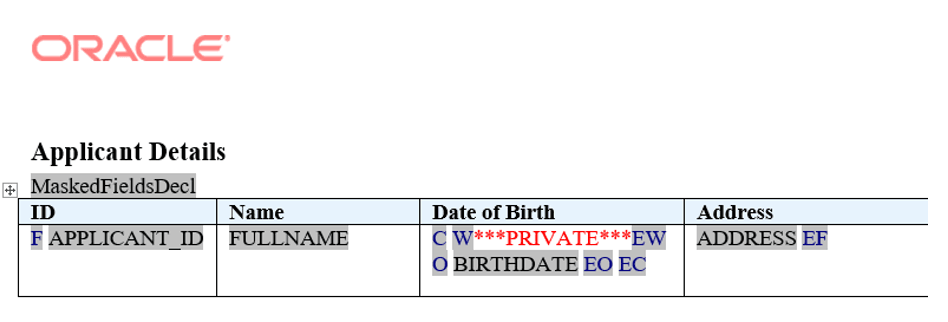
The following table shows the entries made in the template shown in the above figure:
| Default Text | Form Field Entry | Description |
|---|---|---|
|
MaskedFieldsDecl |
<xsl:param name="MaskedFields" xdofo:ctx="begin"/> |
Runtime parameter declaration. |
|
F |
<?for-each:row?> |
Opening for-each loop for the row element. |
|
APPLICANT_ID |
<?APPLICANT_ID?> |
Placeholder for APPLICANT_ID element. |
|
FULLNAME |
<?FULLNAME?> |
Placeholder for FULLNAME element. |
|
C |
<?choose:?> |
Opens the choose statement. |
|
W |
<?when: contains($MaskedFields,'BIRTHDATE;')?> |
Tests if BIRTHDATE element is contained in list of masked fields. If it does, the boilerplate text ***PRIVATE*** that follows, is displayed. Note: Include trailing semi-colon after the masked field. |
|
EW |
<?end when?> |
Ends when condition test. |
|
O |
<?otherwise:?> |
If the previous condition tests are not true, the form field/text that follows this is displayed. |
|
BIRTHDATE |
<?format-date:BIRTHDATE;'LONG'?> |
Displays the BIRTHDATE element as a formatted date. |
|
EO |
<?end otherwise?> |
Ends the otherwise statement. |
|
EC |
<?end choose?> |
Ends the choose statement. |
|
ADDRESS |
<?ADDRESS?> |
Placeholder for ADDRESS element. |
|
EF |
<?end for-each?> |
Closing tag for the for-each loop. |
This is one example to show how conditional logic may be applied in RTF templates.
For other possible ways to use conditional logic, see Fusion Middleware Report Designer's Guide for Oracle Business Intelligence Publisher, “Creating RTF Templates,” Using Conditional Formatting.
Masked Data Fields in a Connected Query
A connected query can generate hierarchical XML.
When a BI Publisher
report uses a connected query data source, the $MaskedFields runtime
parameter will contain a semi-colon separated list of all masked fields
in their full XPath form.
This example shows an
XML generated from a connected query data source, and the corresponding
value of $MaskedFields for such a BI Publisher report using this data source.
This example illustrates a sample XML Data.
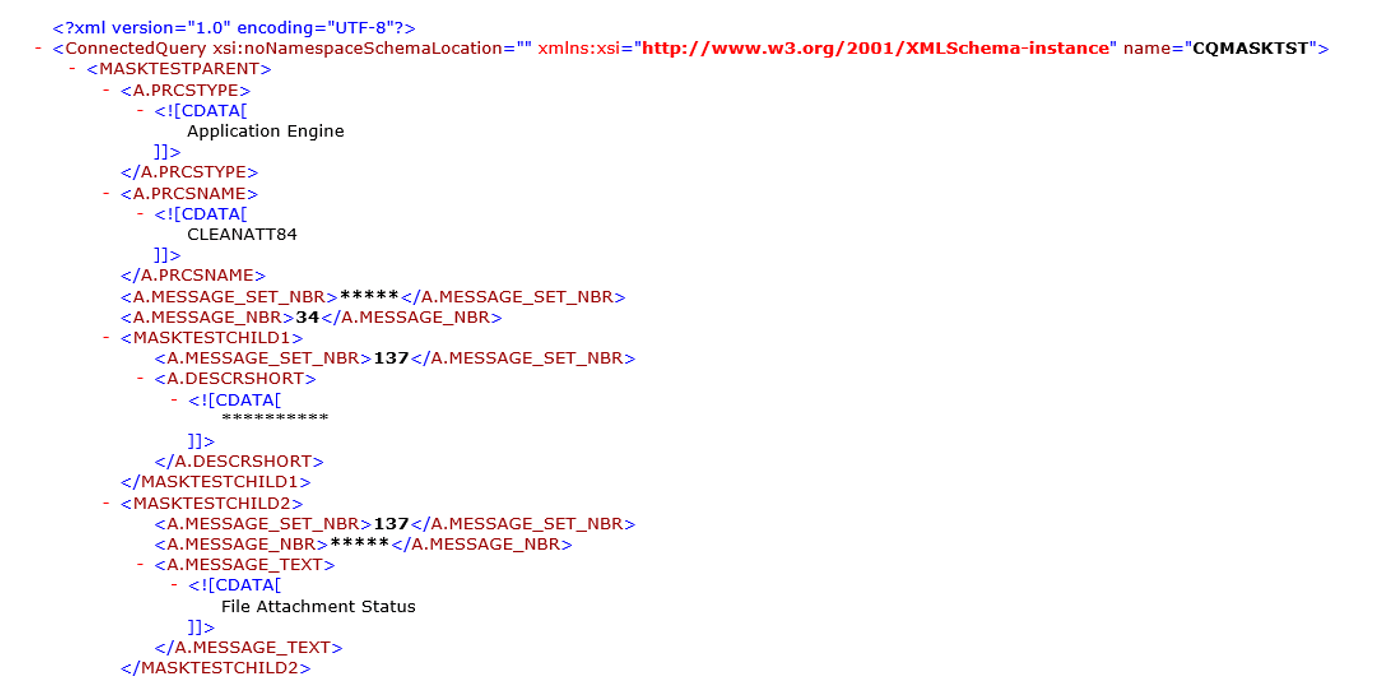
For this XML data, the $MaskedFields runtime
parameter value will be:
MASKTESTPARENT/A.MESSAGE_SET_NBR;MASKTESTPARENT/MASKTESTCHILD1/A.DESCRSHORT;
MASKTESTPARENT/MASKTESTCHILD2/A.MESSAGE_NBR;
Related Topics