Passing Parameters
The system may need to pass runtime parameters into the BI Publisher core engine. Numbers and text are sent as strings with single quotes. By default, PeopleTools( through the ReportDefn class ProcessReport method) always passes the following parameters/tags:
<?$ReportID?>
<?$ReportTitle?>
<?$RunDate?>
<?$RunTime?>
These tags can be included in an RTF template layout wherever they are needed. These parameters are especially useful for report headers. Before inserting these parameters into an RTF template (or sub-template), the following declarations must be entered under a form field at the top of the report's primary template; one for each parameter called:
<xsl:param name="ReportID" xdofo:ctx="begin"/>
<xsl:param name="ReportTitle" xdofo:ctx="begin"/>
<xsl:param name="RunDate" xdofo:ctx="begin"/>
<xsl:param name="RunTime" xdofo:ctx="begin"/>
The PeopleSoft-delivered BI Publisher report XRFWIN demonstrates the usage of these values in a report calling a sub-template for a header.
To declare and use these parameters in an Excel template:
-
Open your Excel template and right-click the worksheet name at the bottom-left corner.
-
Select Unhide to unhide the hidden worksheet named XDO_METADATA.
-
In the XDO_METADATA worksheet, add the values of parameters specified in the following table, below the existing entries:
Parameter Value XDO_PARAM_?1?<?param@begin:ReportID;Missing?>
XDO_?ReportID?<?$ReportID?>
XDO_PARAM_?2?<?param@begin:ReportTitle;Missing?>
XDO_?ReportTitle?<?$ReportTitle?>
XDO_PARAM_?3?<?param@begin:RunDate;Missing?>
XDO_?RunDate?<?$RunDate?>
XDO_PARAM_?4?<?param@begin:RunTime;Missing?>
XDO_?RunTime?<?$RunTime?>
Note:
Replace Missing in the declaration entry, with any other default text that you prefer to display, if the runtime parameters have not been provided.
-
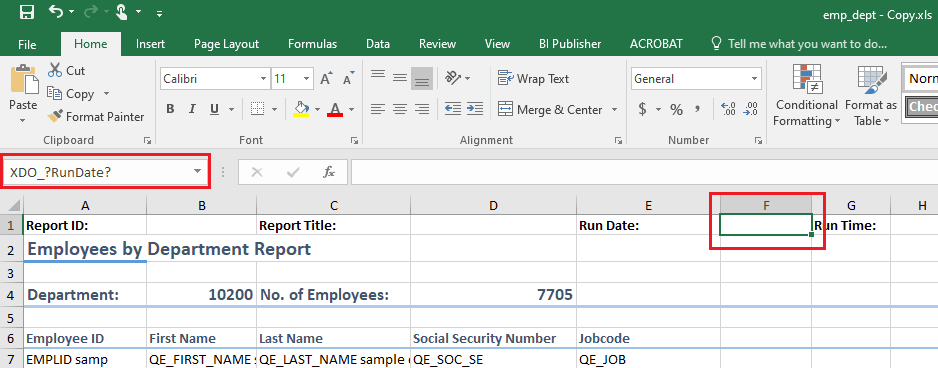
In the main worksheet of the template, select the cells where you want to place these parameters and enter the value of the parameter as mentioned in the hidden worksheet. “XDO_?RunDate?” parameter is placed as an example in the following image.
Example showing the selection of cells where value of parameter must be entered as mentioned in hidden worksheet XDO_METADATA
For the standard parameter passage of report ID and report description, the translation of report descriptions may become important for report headers. BI Publisher includes PeopleSoft-related language tables for the data source, and report and template tables that support the report’s data language values for the description fields.