Setting Up Report Categories
Access the Report Category page (Select .)
This example illustrates the fields and controls on the Report Category page. You can find definitions for the fields and controls later on this page.
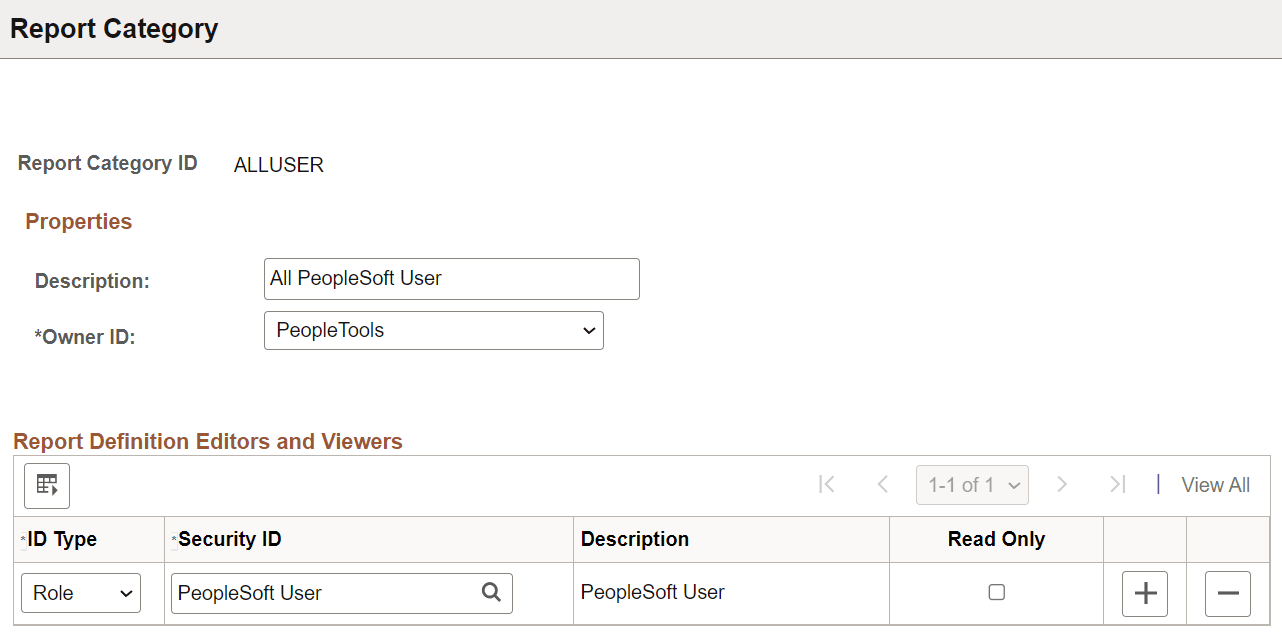
Report Category is a required attribute on all report definitions and Content Library sub-templates. By assigning a report category, you are actually applying row level security to the data on those components.
| Field or Control | Description |
|---|---|
|
Report Category ID |
Enter a report category ID to define a grouping that enables users to control who can access and edit report definitions and Content Library sub-templates. |
|
Description |
(Optional) Enter descriptive text that provides more detail about the report category. |
|
Object Owner ID |
Indicate which product, feature, or application owns this report category. |
|
ID Type |
Select an ID type of either Role or User ID to grant authorization to. |
|
Security ID |
Select the authorized editor’s security ID based on the ID type. |
|
Description |
A read-only field that indicates the related display value for the security ID. |
|
Read Only |
(Optional) Select to indicate that the designated ID is only able to view the report definitions under this category and not update them. |
Note:
The PeopleCode BI Publisher classes also respect report category settings and read-only access rights.