Applying Updates To A Target Environment
The apply process enables you to apply one or more change packages to the target environment. A typical change package apply process, would be as follows:
-
Apply the change package without compare to your demonstration environment.
Since the demonstration environment does not contain any customizations, there is no need to compare. This brings the demonstration environment current on the specific maintenance, overwriting the new maintenance into the demonstration environment.
-
Apply the change package to the first customized environment by using the 'Apply with Database Compare/Copy' option.
This uses your demonstration database as the source and this customized environment as the target. This process augments the normal Change Assistant template/job in order to compare the change project from the demonstration database to the target database.
-
Use the PeopleTools database compare and copy utilities to reconcile the new changes from PeopleSoft with your customizations, just as you do during an upgrade.
-
Once the reconciled or modified change package is created, it can then be applied without compare into all other customized environments, assuming these customized environments are the same.
To apply change packages to the target environment:
-
The Environment Management Hub must be up and running.
-
In Change Assistant, select Tools, Change Actions.
-
Select Apply Updates.
-
Select Apply Change Packages and click Finish.
-
Apply Change Packages Wizard starts.
You use the Apply Change Packages wizard to select the appropriate settings for a change package.
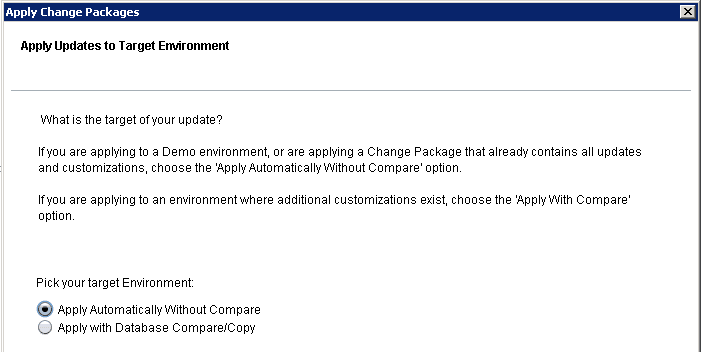
This example illustrates the fields and controls on the Apply Updates to Target Environment page. You can find definitions for the fields and controls later on this page.
| Field or Control | Description |
|---|---|
|
Apply Automatically Without Compare |
Applies the change package to the target environment and copies the project without initiating any compare reports or analysis. Select this option if you are:
|
|
Apply With Database Compare/Copy |
Select this if you are beginning the process of migrating a PeopleSoft-delivered change package to your customized environments. In this case, you are applying to a customized environment, and this will require the use of PeopleTools' change management tools, such as compare and copy. |
Note:
When applying multiple updates, a job set may not move on to the next update if there are steps in the current update with a status of Warning rather than Success. In this situation, review the logs for the steps with warnings and take any corrective measures, as needed. Then change the status of these steps from Warning to Complete to proceed to the next change package in the job set.