Configuring the Microsoft Windows Client Running Change Assistant
Change Assistant needs to be run from a Microsoft Windows client. It is highly recommended that you dedicate a Microsoft Windows client machine that is not used for other PeopleSoft purposes for each PeopleSoft Update Image (PI). It is necessary to configure this Microsoft Windows client machine to access your target environment, as well as the PI. This setup is necessary for Change Assistant to communicate with the PI and target databases in 2-tier mode in order to correctly install updates.
In setting up the Microsoft Windows client, be sure to review the software versions listed on the My Oracle Support home page for the PI you are using, as these will impact your setup.
Note:
This documentation uses "release/patch" to refer to the PeopleSoft PeopleTools release, for example, 8.54, and patch number, for example 06. This release/patch example is written as 8.54.06.
The Microsoft Windows client needs to include:
-
Oracle Database Client at a version level that is certified for the PeopleSoft PeopleTools release included on the PI.
See My Oracle Support, Certifications
-
Database Client for target database platform (if the target RDBMS is not Oracle).
-
For a target database that is not Oracle, you must always install the database client for your database platform.
-
For a target database that is Oracle, it may be necessary to install a second Oracle Database Client if the target database is not at the same PeopleTools release level as the PI.
For example, PeopleTools 8.53 uses a 32–bit client and PeopleTools 8.54 requires a 64–bit client.
-
-
PeopleTools Client for Oracle database platform at the same version level of the PI.
Note:
The PeopleTools client will work with all your target databases that are on the same PeopleTools release as the PI in carrying out PUM-enabled maintenance as long as the PeopleTools client is installed from the tools_client shared drive. If your target database is on a different PeopleTools release, you will need to install a second PeopleTools Client for that PeopleTools release.
-
PeopleTools Client for target database platform at a version level supported by the PI.
Note:
The supported PeopleTools client installer is available in the tools_client share. It is not necessary to upgrade the target database to the supported PeopleTools release patch level. The target database will work with the PeopleTools client.
-
Change Assistant installed from the PS_HOME directory for the PeopleSoft Update Image on the Microsoft Windows client. However if the target database is at a higher release level than the PeopleSoft Image, then the latest tools version must be used to install Change Assistant. For example, the customer upgrades the target database to 8.56 and the latest PeopleSoft Image is still on 8.55, the customer must use Change Assistant 8.56 to apply updates.
Note:
This use of PS_HOME refers to the location created by the client installation. You may need more than one client PS_HOME location, when you configure the Microsoft Windows Client. This documentation also uses "PS Home" in some cases to match the syntax on the Change Assistant UI.
After you install and initialize the PI, you access a shared drive which makes the folders from the image accessible to the host (Microsoft Window OS).
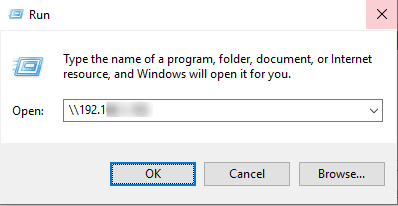
From Windows Explorer access the virtual appliance file system from your Microsoft Windows host by selecting Start, Run, and entering the Microsoft Windows UNC path containing your virtual machine IP address.
This example illustrates the fields and controls on the Microsoft Windows Run dialog box with IP address.
The shared drive includes 3 folders:
The <product>_pi_home folder contains all files needed for patching.
The <product>_app_home folder contains the application home for the PUM source.
The tools-client folder includes the following:
-
client-858
The client-858 folder includes a Readme file, a manifest with version information, archives, and scripts for deployment of the PeopleSoft PeopleTools 8.58 client home folder.
-
client-859
The client-859 folder includes a Readme file, a manifest with version information, archives, and scripts for deployment of the PeopleSoft PeopleTools 8.59 client home folder.
-
client-860
The client-860 folder includes a Readme file, a manifest with version information, archives, and scripts for deployment of the PeopleSoft PeopleTools 8.60 client home folder.
-
oracle-client
The oracle-client folder includes a Readme file, a manifest with version information, archives, and scripts for deployment of the Oracle 19c database client home folder.
-
SetupPTClient.bat — Interactive script that installs the PeopleSoft PeopleTools components such as Application Designer and Change Assistant.
You supply information such as the PeopleSoft PeopleTools release and the RDBMS platform.
-
source.properties — A text file that includes information required for the setup. Do not edit this file. The information is supplied by the setup scripts.
-
tnsnames.ora — Oracle database connectivity file. The file includes the information for the source (PI) database.