Microsoft Windows Client Configuration
This table describes the Microsoft Windows client installs and when it needs to be installed.
| Microsoft Windows Client machine install | When you need this install |
|---|---|
|
Oracle database 64-bit client |
Always install for PUM source. |
|
Enter the tnsnames entry into the tnsnames.ora file |
Always enter tnsnames entry for PUM source database. If target database is on Oracle enter the tnsnames entry for the target database. |
|
PeopleTools 8.60 client |
Always install for PUM source. |
|
PeopleTools 8.53 through 8.58 |
Install the PeopleTools client that matches the target environment. Note: If your target database is on a different release than the PUM source, you will have 2 PS homes. |
|
Oracle database 32-bit client |
Required if target environment is on PeopleTools 8.53. |
|
Target database client environment Set up database connectivity. |
Required if target environment is not on Oracle. |
This diagram illustrates the relationship between the Microsoft Windows client running Change Assistant and the PI when your target database is not Oracle.
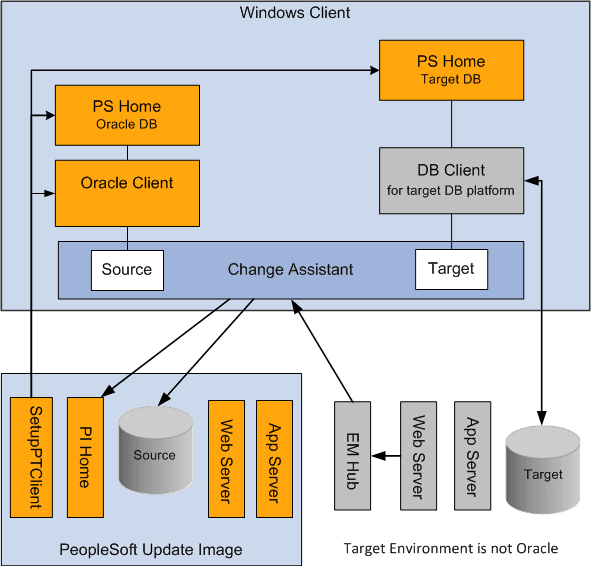
When the target environment is not on Oracle database, you will always have 2 PS Homes and 2 database clients (one for Oracle and one for the target database platform). The PS Home for the PUM Source database will be on PeopleTools 8.60 and the Target PS Home will be on the same release as the target database.