Reviewing PTIA Reporting
This section discusses:
-
Understanding PTIA Reporting
-
Reviewing the Tables Referenced Report
-
Reviewing the Customization Impacts Report
-
Reviewing Execution Report by Section – Duration
-
Reviewing Execution Report by Section – Start Time
-
Reviewing the Execution Report by Step
-
Reviewing the Execution by Thread Report
-
Reviewing the Thread Duration Report
-
Reviewing the Execution Comparison Report
-
Reviewing the Table Analysis Report
-
Reviewing the Data Conversion Report
Understanding PTIA Reporting
You can query all tables populated and leveraged by PTIA (as identified previously) through the various platform specific query tools or psquery. You can gather information in the PTIA tables to identify the following:
-
Tables referenced in the data conversion code.
-
Steps impacted by customizations (prior to the initial data conversion run).
-
Performance issues (after the initial data conversion run).
-
Impact of changes (run to run timing comparisons).
Oracle has delivered a series of standard reports to address the most commonly accessed information in the PTIA repository.
Reviewing the Tables Referenced Report
PTIA0001.SQR lists all tables referenced within the Application Engine data conversion programs. For each table listed, the report displays the section and step in which it is used, whether it is a data source or data target table, and the type of SQL statement in which it is referenced. This report is sorted by table name. Data for this report comes from the PS_PTIA_ANALYSIS, PS_PTIA_DTLIDSQLS, and PS_PTIA_DTLIDTBLS tables. This report can be run anytime after the PTIAANALYSIS Application Engine program has run and populated the PTIA tables used by this SQR.
Reviewing the Customization Impacts Report
PTIA0002.SQR shows the section/steps within the Application Engine data conversion programs that referenced tables with custom added fields. This report is sourced from the PS_PTIA_ANALYSIS table and the PSPROJECTITEM table. This report must be run after the customizations project has been compared against the New Release Demo database.
Reviewing Execution Report by Section – Duration
PTIA0003.SQR shows the duration or execution time for each Application Engine section. Since this report is at a section level, the information is sourced from the PS_PTIA_RUNDETAIL table. The report is ordered by execution time with the poorest performing steps at the top. This report can be run anytime after the PS_PTIA_RUNDETAIL table has been populated for the data conversion run on which you want to report.
Reviewing Execution Report by Section – Start Time
PTIA0004.SQR shows the duration or execution time for each section. Since this report is at a section level, the information will be sourced from the PS_PTIA_RUNDETAIL table. The report would be ordered by start time so that you can see the order in which the sections were executed. This report can be run anytime after the PS_PTIA_RUNDETAIL table has been populated for the data conversion run on which you want to report.
Reviewing the Execution Report by Step
PTIA0005.SQR shows the execution time for each section and the associated steps that were run.
This report requires a trace of 16,384 or higher.
Since this report is at a step level, it assumes that a trace of 16,384 or higher has been run so that the step information could be obtained from the PS_PTIA_TIMINGS_DT table. If the appropriate trace has not been run, then a report is not created and output files will be produced. The report will be ordered by execution time with the poorest performing steps at the top.
Reviewing the Execution by Thread Report
PTIA0006.SQR shows the execution timing of each Application Engine section run as part of the data conversion process. This report is sorted so that you can see which sections were executed by each thread. This report is sourced from the PS_PTIA_RUNDETAIL table.
Reviewing the Thread Duration Report
PTIA0007.SQR shows the total duration time for each thread used during the data conversion process. This report is sourced from the PS_PTIA_RUNDETAIL table. It can be run anytime after the PS_PTIA_RUNDETAIL table has been populated from the data conversion run on which you want to report.
Reviewing the Execution Comparison Report
PTIA0008.SQR shows the execution duration from the current run of data conversion as compared to the execution duration from the previous run of data conversion. This report is sourced from the PS_PTIA_RUNDETAIL table. This report can be run anytime after the PS_PTIA_RUNDETAIL table has been populated for the data conversion runs on which you want to report.
Note:
Run this SQR after data conversion is finished. This report will help fine-tune the data for a subsequent upgrade pass.
Reviewing the Table Analysis Report
PTIA0009.SQR indicates how a particular application table is impacted by the create/alter scripts as well as the data conversion process during the PeopleSoft upgrade. This report is sourced from the PS_PTUALTRECDATA, PS_PTUALTRECFLDDAT, PS_PTIA_ALTRECDATA, PS_PTIA_ANALYSIS, and PS_PTIA_DTLIDTBLS tables. This report can be run after the Alter Analyzer and the AE Analyzer processes have successfully completed. This report is designed to be run against the initial pass database as the data stored in the tables during the Move to Production will differ.
Reviewing the Data Conversion Report
Each of the upgrade data conversion sections contains comments that describe the processing performed by the section. Oracle delivered an SQR (PTIA0010.sqr) to list all of these comments by the group and sequence numbers that determine how they run. The name of this report is PTIA0010.
To run PTIA0010:
-
Using SQRW, run SQR PTIA0010 on your copy of Production database.
-
When prompted for upgrade path, enter (for example):
HC90
CR90
CR91
To run the report from PIA:
-
Select
-
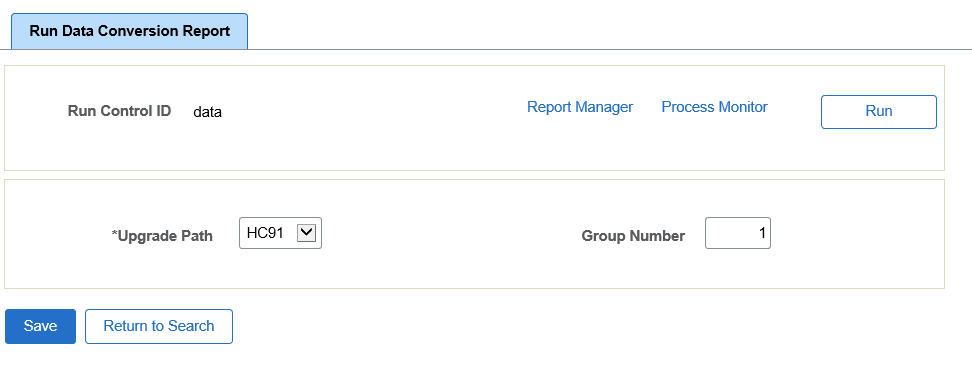
Enter the Upgrade Path and Group Number.
-
Click Run.
This example illustrates the fields and controls on the Run Data Conversion Report.