Defining Materialized Views
To define a materialized view:
-
In PeopleSoft Application Designer, select to create a new record.
-
Add fields to the record, and insert the SQL query using the Query Editor.
-
Select the Record Type tab.
-
Select SQL View or Query View for the Record Type, whichever is appropriate.
-
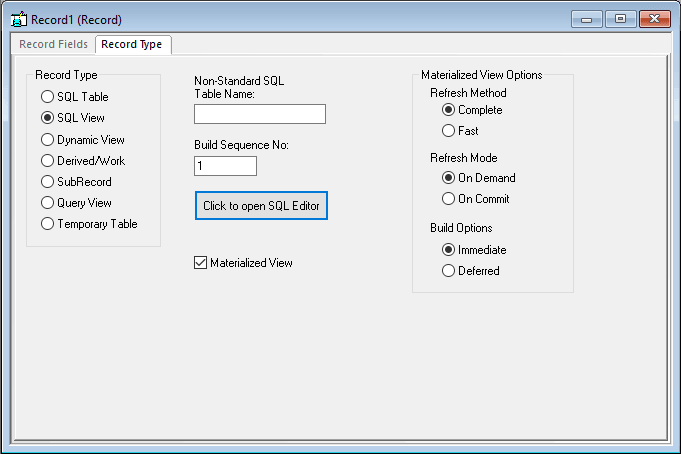
Select the Materialized View check box.
This check box is available only on the Oracle platform.
The Materialized View Options appear.
This example shows the Record Type tab when creating a materialized view on the Oracle platform.
-
Specify the Refresh Method. Options are:
Field or Control Description Complete
The materialized view table will be refreshed completely. Can be done at any time; time consuming.
This is the default option.
Fast
Refreshes only modified rows. The materialized view table will be refreshed incrementally when running the Application Designer Build option.
-
Specify the Refresh Mode. Options are:
Field or Control Description On Commit
Refreshes occur whenever a commit is performed on one of the view's underlying detail table(s). Available only with single table aggregate or join-based views. This option has a performance impact since commit happens in the base table as well as the materialized view. During a commit, the Oracle system executes triggers and updates the materialized view log tables.
On Demand
Administrators refresh the view through the Materialized View Maintenance page. Can be used with all types of materialized views. This is the default option.
-
Specify the Build Options. Values are:
Field or Control Description Immediate
The system creates the view and populates the view from the base tables. This may be time consuming depending upon the complexity of the view and data.
This is the default option.
Deferred
The system creates the view but does not populate the view during the build process. An administrator must run a refresh from the Materialized View Maintenance page.
-
Save the record.
Materialized Views are assigned automatically to the PSMATVW tablespace.
-
Build the record, selecting Create Views in the Build dialog box.
For information about creating and building records, see: