Maintaining Materialized Views
For ongoing maintenance of materialized views, administrators can use the Materialized View Maintenance page (PTMAT_MAINT). Administrators must have the Materialized View Administrator role to have permission to access this page.
Access the Materialized View Maintenance run control page ().
This image illustrates the fields and controls on the Materialized View Maintenance page.
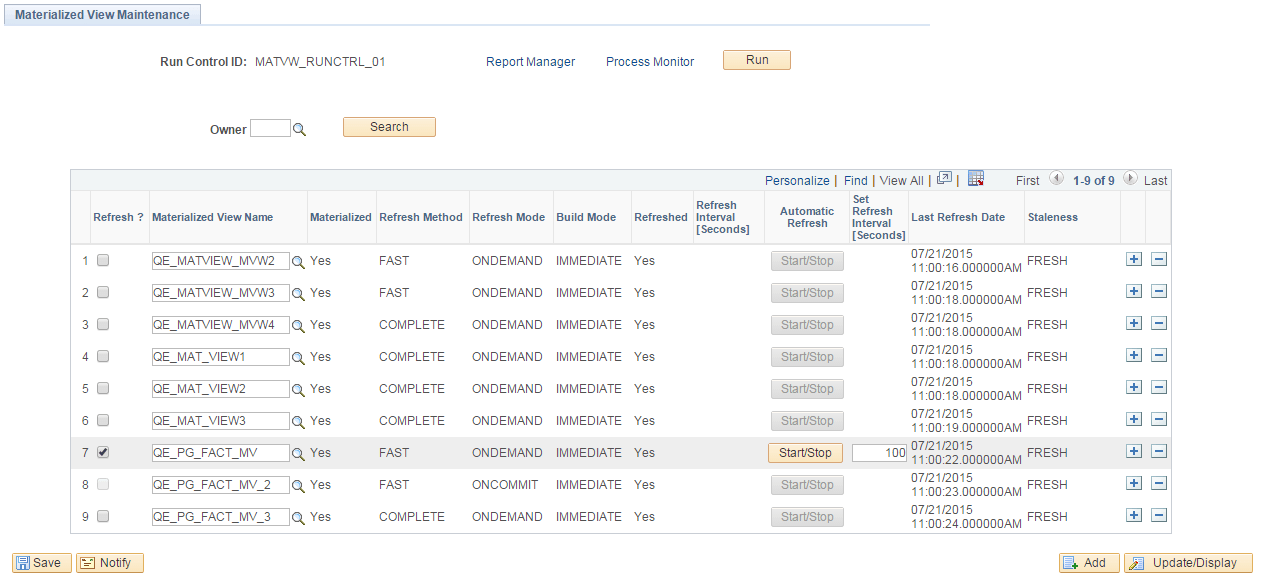
This page contains a grid that is populated with a list of the records in the materialized views table, PSPTMATVWDEFN.
| Field or Control | Description |
|---|---|
|
Owner |
To limit the grid to records that belong to a specific owner, enter the owner name and click Search. |
|
Refresh ? |
Click to schedule a refresh for the record. |
|
Materialized View Name |
Lists the name of the record. You can change the value in this field. |
|
Materialized |
A display-only field that indicates if the record is materialized (Yes) or not (No). |
|
Refresh Method |
Lists the refresh method, either complete or fast. |
|
Refresh Mode |
Lists the refresh mode, either on demand or on commit. |
|
Build Mode |
Lists the build mode, either immediate or deferred. |
|
Refreshed |
Indicates if the record is refreshed (Yes) or not (No). |
|
Refresh Interval [Seconds] |
Displays the time interval in seconds for the refresh procedure to run. |
|
Automatic Refresh |
Toggle the button to start a refresh schedule every time interval in seconds. |
|
Set Refresh Interval [Seconds] |
Enter the interval in seconds to refresh the record every n seconds. |
|
Last Refresh Date |
List the date and time the record was last refreshed. |
|
Staleness |
Indicates if the record is stale or fresh based on the Oracle System Catalog. |
|
Run |
Click to execute the PTMATREFVW Application Engine program, to refresh the selected records. |
When you click the Run button, the PTMATREFVW Application Engine program executes. It brings up the Process Scheduler Request page. Enter the appropriate server on the page and click the OK button to initiate the process.
The following illustrates the PTMATREFVW Application Engine process that requires to be initiated for refreshing the materialized views.
