Understanding How to Run SYSAUDIT
The System Audit (SYSAUDIT) identifies orphaned PeopleSoft objects and other inconsistencies within the system. An example of an orphaned object is a module of PeopleCode that exists, but which does not relate to any other objects in the system.
Select Add a new Run Control ID or select an existing one to access the System Audit page. Select the appropriate check boxes to run the audits that you want.
This example illustrates the fields and controls on the System Audit page.
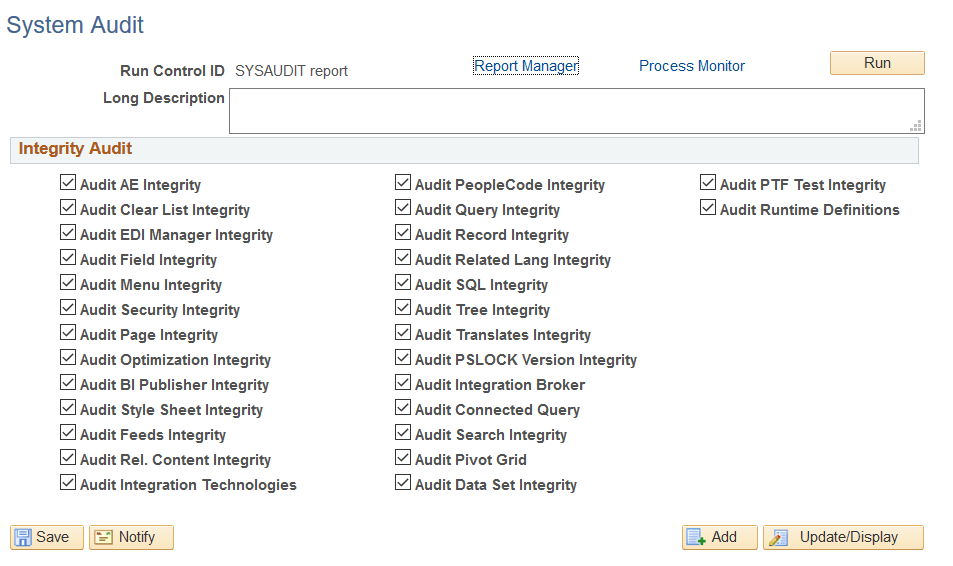
| Term | Definition |
|---|---|
|
Audit AE Integrity |
Audits PeopleSoft Application Engine program definitions and components. |
|
Audit Clear List Integrity |
Audits the SYSCLRLIST* component. |
|
Audit EDI Manager Integrity |
Audits the EC* component for EDI Manager. |
|
Audit Field Integrity |
Audits the DBFLD* component for Application Designer fields. |
|
Audit Menu Integrity |
Audits the MENU* component for Application Designer menus. |
|
Audit Security Integrity |
Audits the AUTH*, OPRDF* components for PeopleTools Security. |
|
Audit Page Integrity |
Audits the PNL* component for Application Designer pages. |
|
Audit Optimization Integrity |
Audits the definitions for Optimization Engine. |
|
Audit BI Publisher Integrity |
Audits the referential integrity of the tables of the definitions that are associated with BI Publisher. |
|
Audit Style Sheet Integrity |
Audits the referential integrity of the tables of the definitions that are associated with style sheets. |
|
Audit Feeds Integrity |
Audits the referential integrity of the tables of the definitions that are associated with feeds. |
|
Audit Rel. Content Integrity |
Audits the referential integrity of the tables and definitions associated with the Related Content. |
|
Audit Integration Technologies |
Audits integration technologies other than those used for PeopleSoft Integration Broker, including file processing URL definitions and Ren Server SSL configuration. |
|
Audit PeopleCode Integrity |
Audits the PCM* and PRG* components for PeopleCode programs. |
|
Audit Query Integrity |
Audits the QRY* component for PeopleSoft Query. |
|
Audit Record Integrity |
Audits the REC* and VIEWT* components for Application Designer records. |
|
Audit Related Lang Integrity |
Audits Related Language Integrity. Query the *LANG component. |
|
Audit SQL Integrity |
Audits the referential integrity of the tables supporting SQL objects in the db component. |
|
Audit Tree Integrity |
Audits the TREE* component. |
|
Audit Translates Integrity |
Audits the XLAT* component. |
|
Audit PSLOCK Version Integrity |
Audits the VERSN* component. |
|
Audit Integration Broker |
Runs a collection of audits on the Integration Broker configuration. |
|
Audit Connected Query Integrity |
Audits the referential integrity of the tables of the definitions that are associated with connected query. |
|
Audit Search Integrity |
Audits the referential integrity of the tables and definitions associated with the PeopleSoft Search Framework and PeopleSoft Search. |
|
Audit Pivot Grid |
Audits the definitions for pivot grids. |
|
Audit Data Set Integrity |
Audits the definitions for application data sets. |
|
Audit PTF Test Integrity |
Audits the PeopleSoft Test Framework tests. |
|
Audit Runtime Definitions |
Audits system tables to locate runtime definitions, which should not be combined with design time definitions. See PeopleCode API Reference: Understanding the Managed Object Classes |
To run SYSAUDIT:
-
Select
-
When prompted, enter a new run control ID and click OK.
-
Select the desired Integrity Audit options.
-
Click Run.
-
Select the appropriate settings on the Process Scheduler Request page, and click OK.
Accessing SYSAUDIT Output
When you run SYSAUDIT, you can specify the type and format of the output on the Process Scheduler Request page, as you can with any Process Scheduler request. By default, the results are written to the configured report repository as an Adobe Acrobat PDF file called SYSAUDIT_runctrl_ID.pdf, where runctrl_ID is the run control ID you specified for the audit.
The tables in the following sections list the names of each of the audit queries that SYSAUDIT performs on the PeopleSoft system, what it means if rows are returned, and how to resolve the discrepancies that the audit report uncovers.
Note:
The query names in these tables are arranged alphabetically, and are not necessarily in the order in which they appear in the output.
Related Topics