Understanding Oracle GoldenGate and PeopleSoft Environments
Oracle GoldenGate enables you to offload resource-intensive activities from a production database (source) to a synchronized standby (target) database. Oracle GoldenGate enables access to a physical target database for queries, sorting, reporting, web-based access, and so on, while continuously applying changes received from the source production database. If you use Oracle GoldenGate at your site, PeopleTools provides the infrastructure to use Oracle GoldenGate with your PeopleSoft application databases.
The following diagram depicts how Oracle GoldenGate enables you to incorporate a target database to offload designated read-only transactions, freeing resources to handle the read-write transactions on the source database.
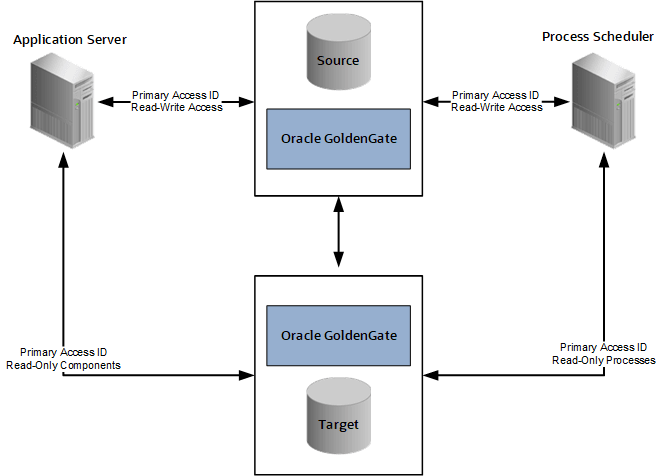
The following table describes the elements within the diagram:
| Element | Description |
|---|---|
|
Source Database (primary) |
Your production database, handling the read-write requests of your transactional system. For example, this database fills orders, updates employee information, adds new product offerings, and so on. |
|
Target Database (standby or reporting database) |
Your clone of the source database designed to handle read-only (RO), or mostly-read-only (MRO), requests so that those transactions can be offloaded from your source database, conserving resources on the production system. Examples of MRO requests include, PSQUERY Viewer, Tree Viewer, components that only submit SELECT SQL to display lists of employees, products, and so on. |
|
Oracle GoldenGate |
Synchronizes the data stored in the source and target databases so that they remain exact duplicates. This is achieved using a combination of Oracle GoldenGate features, DBLINKS, and Remote Synonyms defined by scripts delivered with PeopleTools. |
|
Primary Access ID |
The PeopleSoft access ID used for connecting to the source production database as well as the target database. The access ID and access ID passwords must be the same on the source and target databases. For example, if you use EMDBO as your access ID on the source database, you must also use EMDBO as the access ID on the target database, and you must keep the passwords for EMDBO the same on both databases. Note: Only one access ID is required, unlike Oracle Active Data Guard, where the PeopleSoft implementation requires two access IDs (a source and a secondary access ID). |
|
Read Only components |
When Oracle GoldenGate is enabled and PeopleSoft is configured with a target database, these components are RO enabled:
Other components can also be made to run against the target database, by setting the Read Only option in the component properties dialog box in Application Designer. See Configuring Read-Only Components. Limitations:
|
|
Read Only processes |
When PeopleSoft is configured for Oracle GoldenGate the following processes are enabled, as delivered, to run against the target database: PeopleSoft Query:
PS/nVision:
SQRs:
Audit Utilities:
Other processes can also be enabled to run against the target database by setting the Read Only option on the Process Definition properties page in Process Scheduler. Note: For Scheduled Query, if a user attempts to schedule a query to run against the target database, and selects output type Feeds on the Process Scheduler Request page, that process will be redirected to the source database. This overrides the RO enabled Run Scheduled Query process. Note: The use of Oracle GoldenGate with PeopleSoft batch processing only applies to the following: Application Engine processes run through the Process Scheduler with PSAESRV configured and SQR processes. Note: To enable SQR processes to run against the target database, refer to Configuring Read-Only Processes. SQR Processes that are generally considered reports are ideal candidates for redirection to the target database. |
Oracle GoldenGate needs to be licensed, installed, and enabled for your server before you can begin setting up your PeopleSoft system to take advantage of this feature. See Installing Oracle GoldenGate later in this topic.
The source and target databases need to be set up according to the Oracle GoldenGate documentation.
The basic configuration for PeopleSoft and Oracle GoldenGate (OGG) consists of two databases, the source database and the target database. Characteristics of the server connections to these databases are:
| Server | Connection Characteristics |
|---|---|
|
Application Server |
|
|
Process Scheduler Server |
|
Note:
For an Oracle GoldenGate environment, the secondary connection to the target database utilizes the same login credentials used for the source connection.
Note:
Whether both databases reside on the same or different servers, Oracle GoldenGate binaries need to be installed twice, in two separate directories. One installation is for the source database, and the other is for the target database.
See your Oracle Golden Gate documentation for more information.