Archiving Scheduled Feed Data
Access the Run Feed Archive page ().
This example illustrates the fields and controls on the Run Feed Archive page.

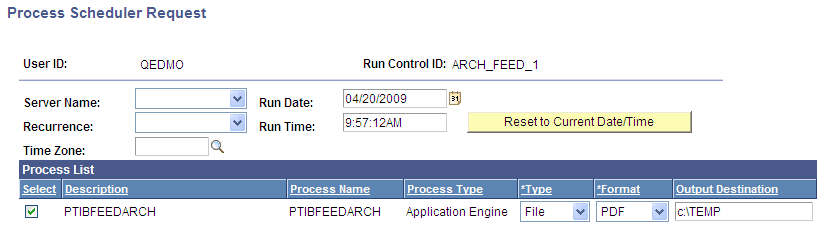
Click the Run button to access the PTIBFEEDARCH process:
This example illustrates the fields and controls on the Process Scheduler Request page showing the PTIBFEEDARCH process.
Use the Run Feed Archive page to archive Integration Broker messages that are used by scheduled feeds. Archiving takes no parameters from the user; parameters for archiving come from the feed definitions themselves.
All scheduled feeds are archived simultaneously; you cannot selectively archive feeds. The process archives and deletes the feed data based on the Archive flag in the Integration Broker queue used in the service operations that published messages to Integration Broker queues. If the Archive flag is enabled, then the messages are archived and then deleted; otherwise, the messages are just deleted.
You can view archived Integration Broker messages by using the Service Operations Monitor. Look for asynchronous services with the Archive flag enabled.
Note:
A scheduled feed can be archived only if the service operations involved in the scheduled feeds are listed in the Feed Service Operations grid on the Define Feed Data Types page.
Note:
Feeds archiving logic is comparable to Integration Broker archiving logic. For a feed message to be archived, you must select the Archive check box on the Queue Definition page for the service operation. If you do not select the Archive check box, then the feeds archiving process deletes the feed messages and the messages do not appear on the Service Operation Monitor - Asynchronous Services page when the Archive check box is selected.