Creating a New Feed Data Type Definition
Access the Define Feed Data Types page (PeopleTools, Feeds, Define Feed Data Types).
This example illustrates the fields and controls on the Define Feed Data Types page. You can find definitions for the fields and controls later on this page.
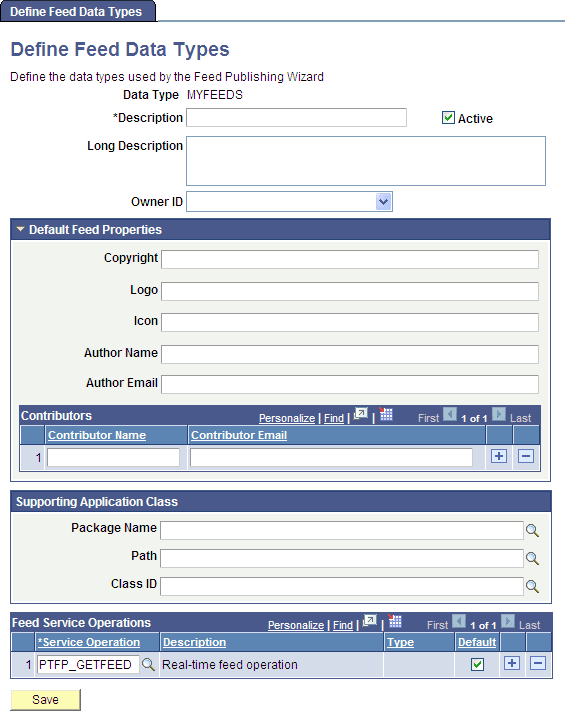
PeopleTools delivers the following feed data types: FEED, GENERICFEED, PSQUERY, PTSF_SES_FEED_DT, and WORKLIST. To create a new feed data type, use the Add New Value field on the search page.
| Field or Control | Description |
|---|---|
|
Data Type |
Displays the type of feed that you are creating or editing. This field is display-only. |
|
Description |
Enter a short description of the type of feed. You may enter up to 30 characters. |
|
Long Description |
Enter a long description of the type of feed to clearly describe its purpose. You may enter up to 255 characters. |
|
Owner ID |
Select the owner ID for the feed data type definition. The owner ID is a way to identify which definitions are owned by which PeopleSoft applications, such as PeopleSoft General Ledger, Accounts Receivables, PeopleTools, and so on. The values in the drop-down list box are Translate table values associated with the OBJECTOWNERID field. |
|
Active |
Select to activate the feed definition. |
Default Feed Properties
Not all readers display all properties. This table describes the default feed properties that some feed readers process and display.
Note:
These properties are the defaults. You can change any of these default properties at the individual feed level.
| Field or Control | Description |
|---|---|
|
Copyright |
Enter copyright information to be included in the XML. |
|
Logo |
Enter a URL to the logo to be included in the XML, for example, http://example.com/img/logo.gif. |
|
Icon |
Enter a URL to an icon to be included in the XML, for example, http://example.com/img/icon.gif. |
|
Author Name |
Enter an author name to be included in the XML. |
|
Author Email |
Enter an author's email address to be included in the XML. |
|
Contributor Name |
Enter a contributor's name to be included in the XML. |
|
Contributor Email |
Enter a contributor's email address to be included in the XML. |
Supporting Application Class
| Field or Control | Description |
|---|---|
|
Package Name |
Enter the application class package name that you want to use for the data type. Each Feed Data Type application class should be associated with one Feed Data Type service operation. |
|
Path |
Enter the application class path that you want to use for the data type. |
|
Application Class ID |
Enter the name of the application class that you want to use for the data type. The class must exist in the application package name that you specify. |
Feed Service Operations
| Field or Control | Description |
|---|---|
|
Service Operation |
Enter the name of the service operations associated with the feed definition that are used to retrieve data. |
|
Type |
Displays whether the service operation is real-time or scheduled. This field is display-only. |
|
Default |
Select this check box to make this service operation the default. |