Choosing a Fluid Layout Page
This section describes the layout pages you can use as the basis for any new fluid pages. Layout pages can be compared to templates. They provide a basic structure to get you started with a fluid page.
Important:
Do not include a layout page in any component definition. Layout pages are templates only for the generation of a new fluid page definition.
This example illustrates the layout page options provided by the Choose Layout Page dialog box.
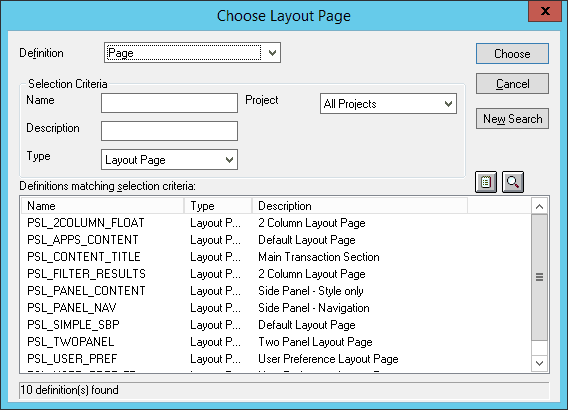
In your new page definition, you may add or remove elements as needed for your purposes. However, make sure to examine the template pages so that you understand how any existing PeopleCode or CSS styles affect the interface.
Important:
Not all of the delivered layout pages are intended for external usage.
Recommended Layout Pages
This table describes the layout pages suitable for fluid application development.
| Layout Page | Description |
|---|---|
|
PSL_APPS_CONTENT |
Use PSL_APPS_CONTENT as the basis for most main fluid pages of type Standard or Secondary. This layout page contains the outermost group box to act as the overall container for the fluid page content. This group box has the ps_apps_content style applied, which provides the outer flexbox necessary for all fluid applications. |
|
PSL_2COLUMN_FLOAT |
This layout page contains nested layout group boxes inside of the outermost group box that has the ps_apps_content style applied. If you’re using this layout page, you need to supply the styling for the child containers based on your needs. |
|
PSL_CONTENT_TITLE |
This layout page includes a special Page Title group box to display a page title on the page. Use this layout page for pages that are displayed inside two-panel wrappers such as activity guides or master/detail components. |
|
PSL_PANEL_CONTENT |
This layout page includes a single container having the default styling for the side panel (left or right panel) usage. If you’re using this template, you also need to specify your own record/field and make sure the appropriate role (ARIA) is applied to the outer container for accessibility. |
|
PSL_PANEL_NAV |
Left (typically) panel usage to contain navigational elements, which control the target page content. Role (ARIA) automatically applied to indicate that the contents will be navigational in nature. |
|
PSL_SIMPLE_SBP |
Use PSL_SIMPLE_SBP as the basis for fluid subpages. Note: After creating a subpage from this layout template, you must change the page type from Standard to Subpage. See Creating Other Fluid Page Types. |
|
PSL_TWOPANEL |
Used in PeopleTools 8.54 to provide a two-panel layout, typically with navigation on the left side and the transaction page on the right. |
|
PSL_USER_PREF |
Use this layout page for creating user preferences to be included as part of My Preferences. |
|
PSL_USER_PREF_FT |
Use this layout page for creating a footer page for user preferences. |
Layout Pages Reserved for Internal Usage
These layout page types are reserved for internal usage by Oracle development teams: PSL_FILTER_RESULTS.
Related Topics