Overriding Delivered Style Classes
The system default style sheet is PSSTYLEDEF_FMODE, which contains all the default, delivered styles for all page elements and controls.
You can create custom free form style sheets in Application Designer, and you can choose to include them and override or extend the default styles at varying levels for page elements.
The system-wide style sheet can be overridden by way of the PeopleTools options page, by selecting the custom style sheet and assigning it to the Default StyleSheet Name option. This is a global, system-wide setting. If set, the system completely ignores any style contained in the delivered style sheet, PSSTYLEDEF_FMODE. Otherwise, if not set, the system applies PSSTYLEDEF_FMODE by default.
Note:
Overriding the delivered system-wide style sheet is not recommended.
Note:
Use PeopleTools, Portal, Branding, Branding System Options to set fluid branding options in the Fluid Component group box.
To incorporate additional style sheets at either the component or page level, use the AddStyleSheet built-in PeopleCode function:
AddStyleSheet(StyleSheet.STYLESHEET_NAME);The AddStyleSheet function adds the reference to the style sheet to the header section of the HTML page.
This example illustrates style sheets added into the HTML <head> section.

In Application Designer, you can also elect to override or extend the default styles, using the Fluid tab for any page or control use the Free Form Style group box to call out styles to be modified. To completely ignore the default style, select Override PeopleTools Style, otherwise you extend or add to the default style. For situations where you have adjustments to make depending on the form factor of the device, you can set those in the Form Factor Override fields for the various form factors.
When working with the order in which style sheets are applied, consider:
-
When you call AddStyleSheet, the system checks if there is a theme with a mapped, skinned style sheet for that style sheet. If so, the system loads that style sheet after the style sheet passed in the argument.
-
The order in which you call AddStyleSheet determines the order in which the style sheets appear in the stylesheet list.
-
The system determines the order in which the PeopleTools style sheets are applied.
-
Regardless of custom changes you may make, standard CSS rules always apply. It is very important for the developers to understand how CSS and style sheets work.
This example illustrates an approach to adjusting the layout of controls based on the form factor of the device accessing the fluid page.
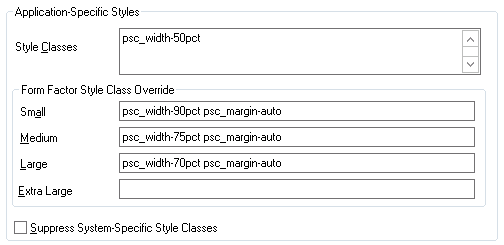
For details on the override options, see Setting Properties on the Fluid Tab.
Free form styles set in Application Designer are static and can’t be changed, however, styles set using PeopleCode are dynamic, meaning they can be switched programmatically at runtime. Styles set in Application Designer can’t be changed or queried using PeopleCode at runtime. Dynamic styles are applied only with PeopleCode; they can be added, changed, deleted or queried at runtime.
It is not recommended to add style to the system containers. Add your own group boxes, and add style to that.
Example:
&fld1.AddFFClass("addffclass");
		&fld1.ReplaceFFClass("addffclass", "replaceffclass");
		&fld1.FreeFormStyleName = "pc_ffclass";
In your implementation, Oracle strongly recommends that you only override style classes with respect to coloring, theme, and branding; a practice often referred to as “skinning.” Oracle strongly discourages overriding delivered style classes with regard to page layout (positioning, padding, filling, and so on).
You only skin complete style sheets, not the sub style sheets contained within a style sheet. To extend (or skin) a delivered style sheet, you want the delivered style sheet to appear first in the style sheet list, followed by the override or “skinned” style sheet. For example, PSSTYLEDEF_FMODE should appear before PSSTYLEDEF_FMODE_SKINNED, allowing the original to be applied, and the “skin,” containing the supplemental changes, to be applied after.
Note:
With CSS style sheet application, the last style sheet in the sequence to be applied takes precedence.
It is recommended to skin or extend only one style sheet at a time. As in, if you have multiple style sheets, have the skinned style sheet appear just after (under) the style sheet it extends or overrides. If the extended or override style sheet appears beneath other style sheets in the list (assuming there are multiple style sheets), any override in the skinned style sheet will apply to any style sheet specified before it, which may result with unintended style overrides.
If you intend on extending or overriding the delivered styles, consider these items:
-
You need to be aware of all the styles applied in any previously applied style sheet(s).
-
If overriding styles, it is recommended to change only color characteristics.
-
It is not recommended to override any styles related to structural (layout or positioning) characteristics or behaviors applied to page elements.
-
Do not modify a delivered style sheet. Any changes will be overridden in any future upgrade.
-
Styles are associated directly to structure (container, label, control, and so on), and any change PeopleSoft makes to structure in future releases can affect any custom styles you’ve implemented.