Setting Device Homepage Defaults
By default, all devices are set to display the fluid homepage after an end user signs on to the PeopleSoft system. If the classic homepage is preferred for any or all device types, you can override the fluid homepage default using the Define Personalization page.
Navigation:
Select .
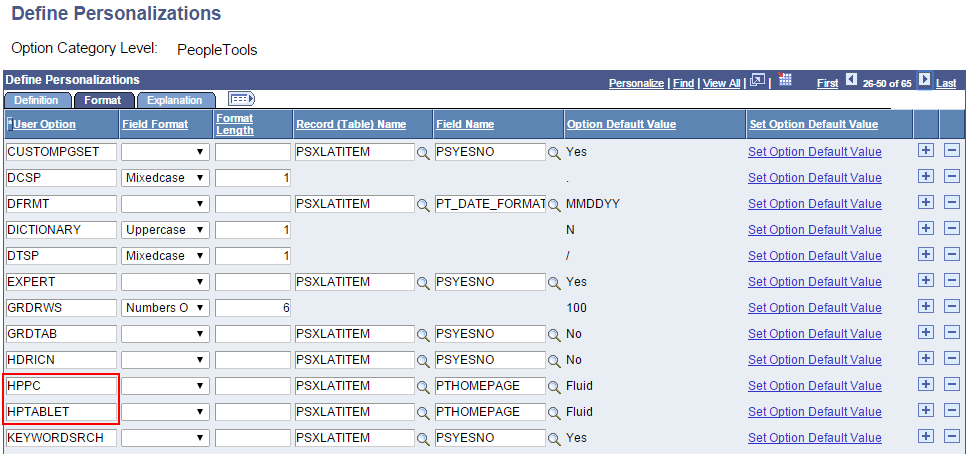
This example shows using the HPPC and HPTABLET options to set system defaults for homepage display.
Important:
The HPPC and HPTABLET user options are system-wide settings. They cannot be exposed to end users to adjust as needed.
These personalization settings are applied to the user’s session based on the PeopleSoft system’s determination of the browserDeviceTypeClass as defined in the web server’s browscap file. (See System and Server Administration: Browser Capabilities for more information on the location and contents of the browscap file.) Three device type classes are defined in the browscap file:
| browserDeviceTypeClass | Homepage personalization option |
|---|---|
|
pc |
HPPC |
|
tablet |
HPTABLET |
|
phone |
None – Fluid is always the default homepage type. |
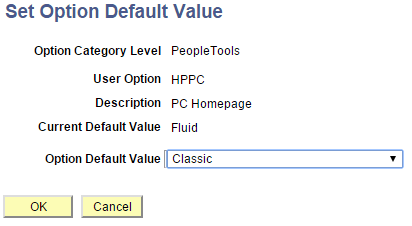
This example illustrates overriding the default homepage of fluid and setting it to classic for PC’s (laptops and desktop computers).