Using the PeopleTools DPKs for the PeopleTools-Only Upgrade
You will use the PeopleTools patch deployment package (DPK) to install your new release. The PeopleTools deployment packages deliver pre-installed PeopleSoft components that can be deployed onto your environment. The PeopleTools DPKs also contain the upgrade documentation, upgrade template, and files.
See the PeopleSoft PeopleTools Patches Home Page on Article ID KA614 for information regarding the PeopleTools patch deployment packages including installation instructions.
This diagram summarizes the scenario for performing a PeopleTools-only upgrade to the new patched PeopleSoft PeopleTools release using DPKs:
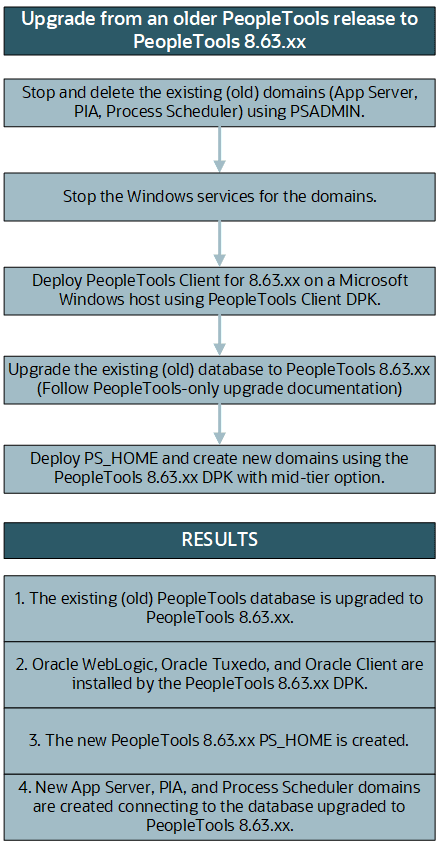
See PeopleSoft PeopleTools 8.63 Deployment Packages Installation, “Performing a PeopleTools-Only Upgrade Using PeopleSoft PeopleTools DPKs” on the PeopleSoft PeopleTools page of the Oracle Help Center, https://docs.oracle.com/en/applications/peoplesoft/peopletools/index.html
This appendix contains detailed instructions on using the DPKs during the upgrade.
When you are ready to start upgrading the PeopleSoft database as described in Step 4 of the diagram, you may go ahead and perform the first two steps to bring down and delete the existing (old) release domains.