Terminology Search Statuses
As you proceed through the Search and Replace process, you will notice that all of the pages display a Status field. This status is updated automatically to reflect where you are in the process.
The default status for all new searches is New.
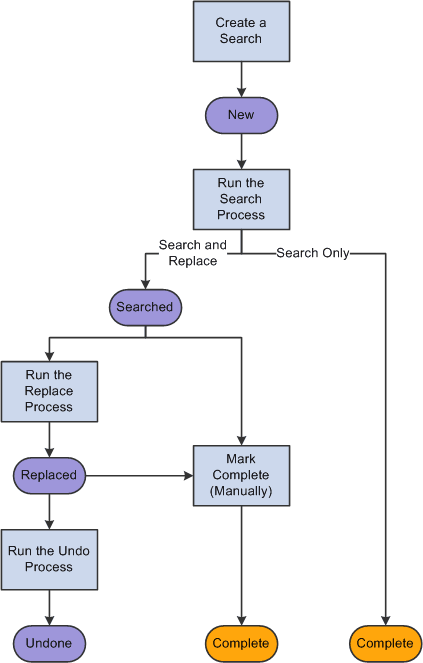
If you configure the search type to disable replacing (that is, if you choose the search-only option when you set up your search criteria), then no further action is possible after the search. Therefore, after the search, the status is updated to Complete. Otherwise, the status is updated to Searched.
Running the Replace process updates the status to Replaced; running the Undo process updates the status to Undone.
You can manually mark the status Complete after searching or replacing. Once the status is Complete, you cannot change your mind. If you decide to make further terminology changes, you must recreate the search criteria using the Copy Search Criteria feature on the Search Criteria Inquiry page.
The following diagram shows the relationship between these terminology search processes and statuses:
This diagram illustrates the relationship between terminology search processes and statuses