Editing Connector Properties
Node-level target connector properties represent parameters that can be used by the connector. These properties are hard-coded in the connector class. The Connector Properties page (IB_CONNPROP) lists all of a connector’s available properties and their values. When you specify a connector in a node definition, only the properties that you are required to set and specify display.
Note:
Available connector properties are automatically entered on the Connector Properties page when you register the connector.
Each property entry is defined by a combination of property ID and property name, both of which must already exist in the connector class. A single connector can handle service operations that adhere to different header formats, communication protocols, or other requirements. You can represent these variations on the Connector Properties page by entering multiple instances of the properties used, each with a different value.
WARNING:
Do not add new properties to any of the delivered connectors, as doing so requires changes to the delivered Java connector programs. Add connector properties only for custom connectors you have created.
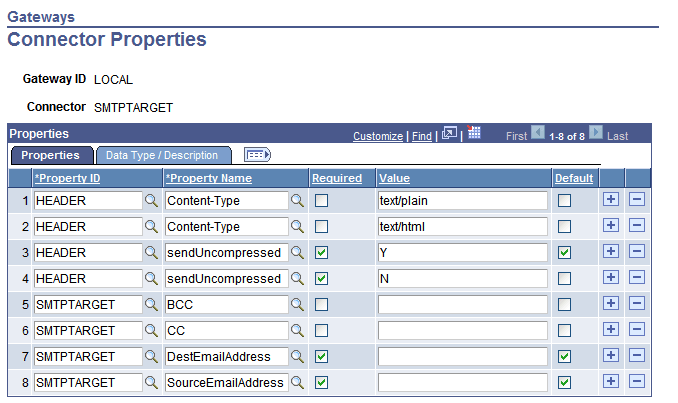
This example illustrates the Connector Properties page and the properties for the SMTPTARGET connector.
To add a new property instance:
-
Access the Connector Properties page (select to display the Gateways page).
-
In the Connectors section locate the row that lists the target connector with which you want to work, and click the Properties link at the end of the row. The Connector Properties page displays.
-
Select a Property ID.
Available property IDs are specific to the connector that you’re configuring.
-
Select a Property Name.
The available property names are specific to the property ID that you selected.
-
If the property is required for the connector to work properly, select the Required check box.
All instances of a property (that is, all identical property ID and property name combinations) should have the same Required status.
-
Enter an appropriate value for the property instance.
Appropriate values might come from PeopleSoft, from the connector’s developer, or from your own experience and requirements.
-
(Optional.) Select the Default check box.
When you specify the connector in a node definition, only properties marked as both required and default appear automatically on the Connectors page of the Node Definitions component.
Note:
In most cases, only one instance (value) of a required property should be used by a given node; however, you might designate multiple values as default so that they all appear. Keep in mind which properties can be used with multiple values and which ones require a single value.
-
Save the properties.
-
Click OK.
The Gateways page appears.