Encrypting Passwords in the PeopleSoft Pure Internet Architecture
The Password Encryption Utility dialog box displays in areas where required or optional passwords are specified.
This example illustrates the Password Encryption Utility dialog box. Use the utility to encrypt passwords.
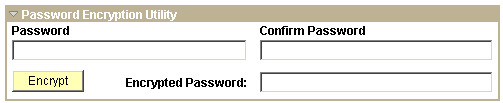
To encrypt a password using the Password Encryption Utility:
-
On the page where you are working, click the Password Encryption Utility arrow to display the dialog box.
-
In the Password field, enter a password.
-
In the Confirm Password field, enter the password again.
-
Click the Encrypt button. The encrypted password displays in the Encrypted Password field.
-
From the Encrypted Password field, cut the encrypted password and paste it into the appropriate location.