Excluding PeopleSoft Authentication Tokens in Outbound Requests to PeopleSoft Nodes
This section discuss how to exclude PeopleSoft authentication tokens in outbound requests to PeopleSoft nodes.
Understanding Excluding PeopleSoft Authentication Tokens in Outbound Requests to PeopleSoft Nodes
A PeopleSoft authentication token in an outbound request to a PeopleSoft target node signifies to the target PeopleSoft target system that the sender is a valid user on its system.
However, for some integrations there can be many users or validating users may not be warranted. In such cases you can exclude the PeopleSoft authentication token from inclusion in outbound requests to PeopleSoft target nodes.
When the PeopleSoft authentication token is excluded in a request, the default user ID for the sending node on the target system is the user ID used for integration authentication.
When you exclude PeopleSoft authentication tokens, user authentication is not performed. In lieu of user authentication, you can perform node authentication when authentication tokens are excluded. The following set-up is required on sending and receiving systems for node authentication:
-
Install application server-based digital certificates.
See Security Administration: Installing Application Server-Based Digital Certificates
-
Implement two-way SSL.
See Security Administration: Installing Web Server-Based Digital Certificates
Viewing Service Operations where PeopleSoft Authentication Tokens Have Been Excluded
Use the Exclude PSFT Auth Token page (IB_SVCSETUP5) to view service operations where PeopleSoft authentication tokens have been excluded.
To access the page, select and click the Exclude PSFT Auth Token tab.
This example illustrates the Services Configuration – Exclude PSFT Auth Token page.
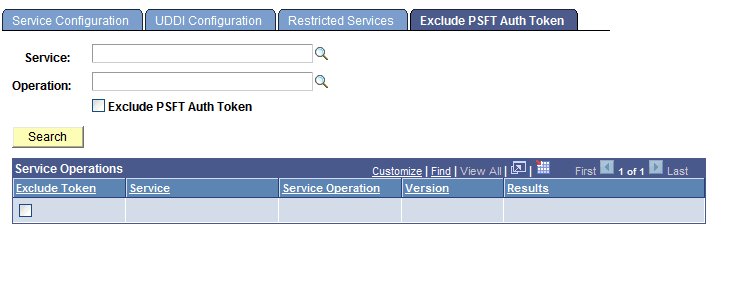
To view service operation where PeopleSoft authentication tokens have been excluded:
-
Access the Exclude PSFT Auth Token page ( and click the Exclude PSFT Auth Token tab).
-
Select the Exclude PSFT Auth Token box under the Operation field.
-
Click the Search button.
The system displays all service operations where the PeopleSoft authentication token has been excluded and will not be included in the service operation transaction.
Excluding PeopleSoft Authentication Tokens in Outbound Requests
Use the Exclude PSFT Auth Token page to exclude authentication tokens in outbound requests:
To access the page, select and click the Exclude PSFT Auth Token tab.
This example illustrates the Services Configuration – Exclude PSFT Auth Token page. The example shows that the PeopleSoft authentication token has been excluded from the QE_ROUTE_ARR and QE_ROUTE_SYNC service operations
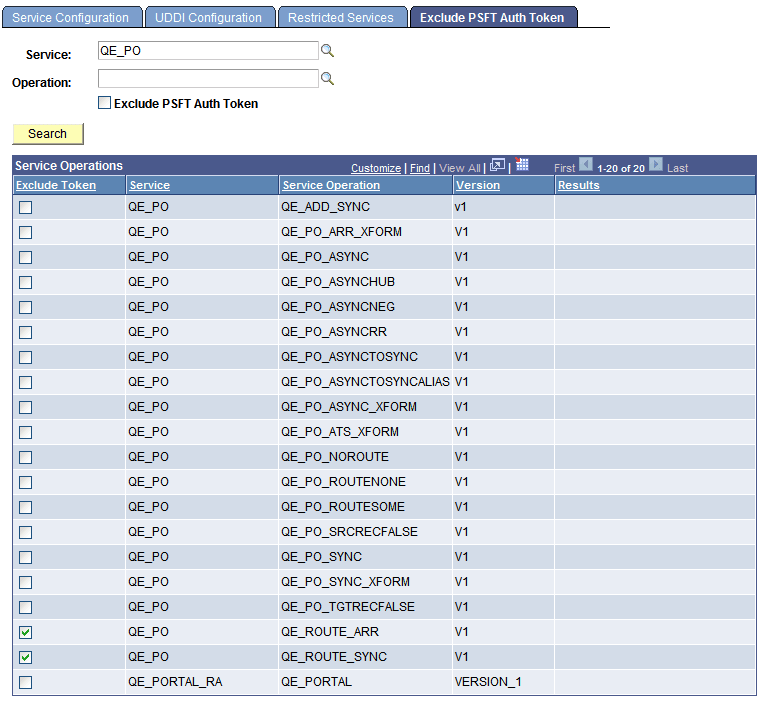
In the example shown, a search was performed on the service QE_PO. The QE_ROUTE_ARR and QE_ROUTE_SYNC service operations have been selected, and therefore the PeopleSoft authentication token will be excluded from those service operations. Scrolling to the right would reveal a Results column that indicates the selection was successful.
To exclude a PeopleSoft authentication token in an outbound request:
-
Access the Exclude PSFT Auth Token page ( and click the Exclude PSFT Auth Token tab).
-
Select one or more service operations from which to exclude the PeopleSoft authentication token:
-
To select one service operation, click the Service and Operation lookup buttons to locate the service operation. Click the Exclude PSFT Auth Token box.
-
To select multiple service operations, enter all or part of the service name or service operation name. Click the Search button. A list of results displays in the Service Operations section. Check the Exclude Token box next to each service operation that should not include a PeopleSoft authentication token.
Note that you can also click the Search button to display all service operations in the database.
-
-
Click the Save button.