Using the JMS Target Connector
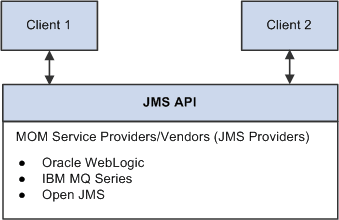
JMS is an application programming interface (API) for accessing message systems. JMS provides a standard Java-based interface to the message services of message-oriented middleware (MOM) providers. The JMS target connector is an adapter to JMS providers, and it can be used with MOM and JMS providers, such as Oracle Weblogic, IBM MQSeries and others. The following diagram illustrates how messages flow through the JMS API:
This diagram illustrations the flow of a message through the JMS API.
The primary features of JMS are.
-
Connection factories that are used to create connections to a specific JMS provider.
-
Separate publish, subscribe, and point-to-point messaging domains.
These are defined by separate interfaces so that a provider does not have to support both.
-
Topics for publish and subscribe, as well as queues for point-to-point messaging.
When multiple applications must receive the same message, publish and subscribe messaging is used. In publish and subscribe messaging, all of the subscribers subscribe to a topic and all of the publishers publish messages to a topic. The messaging system distributes messages from the publisher to the subscriber. This domain is mainly used for asynchronous messaging.
When one application must send a message to another application, point-to-point messaging is used. This domain is only for synchronous messaging. There are two basic types of point-to-point messaging systems. One uses a client that directly sends a message to another client. The other, more commonly used implementation uses a message queue.
The JMS target connector either publishes a message to a topic or inserts a message into a queue, based on the node-level properties that you set.
The JMS target connector supports only JNDI file context for the lookup of connection factories, topics, and queue names. (Lightweight Directory Access Protocol (LDAP) is not supported.)
The connector ID for the JMS target connector is JMSTARGET.
Asynchronous and Synchronous Communication
The JMS target connector provides both synchronous and asynchronous modes of communication. When the node level property ReplyTo is set to False, communication is asynchronous. When it is set to True, communication is synchronous.
For asynchronous communication, the JMS target connector publishes messages to MOM or drops messages into a queue and commits the session. It does not wait for a response from the destination system. For synchronous communication, after the connector publishes messages or drops them into a queue, it waits for the temporary topic or queue to respond.
For synchronous communication, the exchanges involve only the publisher and a single subscriber. When a JMS-compliant remote node receives a synchronous request message from PeopleSoft, it must use the value of the JMSCorrelationID of the request message to populate the correlation ID of its response message. When the response is received by the PeopleSoft JMS target connector, it compares the JMSCorrelationID of the response message with the JMSCorrelationID of the request. The message is not accepted if these two IDs do not match.
When sending messages either synchronously or asynchronously, the connector sets different string properties in the JMS message header. The properties are used as metadata about the message. The JMS target connector also sets a reference to the temporary queue or topic from which it requires the response.
JMS Target Connector and Message Segments
The JMS target connect is segment-aware and you may use it to send message segments to integration partners.
IBInfo Data Contained in JMS Headers
A message has two parts—the transaction data and the IBInfo header that is the routing envelope used by PeopleSoft Integration Broker. In the event that a receiving system wants to make use of the IBInfo data, IBInfo header information is included when publishing messages to non-PeopleSoft systems when using the JMS target connector or the HTTP target connector.
When using the JMS target connector to send messages to non-PeopleSoft systems, the following IBInfo data is contained in the JMS headers. The content of the message (message body) is not impacted.
-
RequestingNode
-
FinalDestinationNode
-
DestinationNodes
-
MessageName
-
MessageType
-
OrigTimeStamp
-
NonRepudiation
Gateway-Level Connector Properties
There are no gateway-level JMS target connector properties that you must set.
Node-Level Connector Properties
You must set either a JMS queue or JMS topic for a given node definition. If both are set or are missing the PeopleSoft Integration Broker generates an invalid message exception.
Note:
You must register JMS-administered objects—such as topics, queues, and connection factories—that you include as connector properties. The documentation for specific providers should provide instructions on how to register the topics.
JMS message types can be Text, Map Message, Stream, or Object. However, PeopleSoft provides only text messages. If you need to use other message types, you can write a class that implements the com.peoplesoft.pt.integrationgateway.common.jms.ProcessJMSMessage interface, and you set the class name as a value for JMSMessageTypeClass.
The provider name that you specify for the JMSProvider in the node definition must match the JMSProvider.JNDIFactory property that you specify in the integrationGateway.properties file.
The following table describes the node-level connector properties:
| Property ID | Property Name | Description |
|---|---|---|
|
JMSTARGET |
AS2MODE |
This property is used for integrations with Oracle SOA B2B Suite. Set the property value to Y to enable integrations with Oracle SOA B2B. Values are:
There are additional JMS target connector properties you must set for integrations with Oracle SOA B2B. See, “JMS Target Connector Properties for Integrations with Oracle SOA B2B” in this section. Note: PeopleSoft recommends using the Oracle SOA Suite B2B component for all EDI integrations, including those based on the AS2 specification. Note: PeopleTools 8.61 is the last release where AS2 Connectors are supported. AS2 Connectors will be removed in future PeopleTools release. |
|
JMSTARGET |
JMSAcknowledgement |
Specify the acknowledgment type. Values are:
|
|
JMSTARGET |
JMSDeliveryMode |
Specify either durable or nondurable delivery. Values are:
|
|
JMSTARGET |
JMSFactory |
Specify the factory name. The default value is QueueConnectionFactory. |
|
JMSTARGET |
JMSMessageTimeToLive |
Specify the time in seconds. |
|
JMSTARGET |
JMSMessageType |
Specify the type of message to send. Values are:
|
|
JMSTARGET |
JMSMessageTypeClass |
(Optional.) Specify the implementation class of ProcessJMSMessage. You must set this property when the JMSMessageType is anything other than Text. |
|
JMSTARGET |
JMSPassword |
(Optional.) Specify the password to access the connection. If you choose to specify a password, you must encrypt it. See Encrypting Passwords. |
|
JMSTARGET |
JMSPriority |
Specify the message priority for delivery. Values range from 0 to 9. A value of 9 indicates the highest priority. The default is 0. |
|
JMSTARGET |
JMSProvider |
Specify the JMS provider's name. Values are:
|
|
JMSTARGET |
JMSQueue |
(Optional.) Specify the queue name, if you use a queue. You must use and specify either a topic or a queue. |
|
JMSTARGET |
JMSReplyTo |
Set this property to True to receive a response from the external system. Values are:
|
|
JMSTARGET |
JMSTopic |
(Optional.) Specify the topic name, if you use a topic. You must use either a topic or a queue. |
|
JMSTARGET |
JMSUrl |
Specify the URL. |
|
JMSTARGET |
JMSUserName |
(Optional.) Specify the username to establish a connection to the JMS. |
|
JMSTARGET |
JMSWaitForResponse |
Specify the time in milliseconds for the connector to wait for the temporary response queue to return a synchronous response message. If a response fails to appear in the queue within the specified period, the transaction fails and the queue is deleted. The default value is 60000 (60 seconds). |
|
JMSTARGET |
RemoveSOAP-Response |
(Optional.) Remove the SOAP wrapping from response messages returned from a third party. The valid values are:
|
|
JMSTARGET |
SOAPUpContent |
(Optional.) Automatically wrap outbound transactions in SOAP format. The valid values are:
|
|
JMSTARGET |
Use-WSA10-Namespace |
(Optional.) Override the WS-Addressing namespace URI used in outbound messages that have been SOAP wrapped via the connector property SOAPUpContent. The valid values are:
|
|
HEADER |
SendUncompressed |
Specify whether to send messages decompressed. Values are:
|
|
HEADER |
SOAPAction |
(Optional.) Enable third-party systems (for example, Universal Description, Discovery, and Integration (UDDI) sites) to receive SOAP transactions over HTTP. The default value is ”“ (a null string). |
JMS Target Connector Properties for Integrations with Oracle SOA B2B
The following table lists node-level properties that you must set for the JMS target connector for outbound integrations with Oracle SOA B2B.
Set these properties on the Nodes – Connector page. To access the page select and click the Connectors tab.
For all properties except for AS2MODE, you must add a new row to the properties grid and manually enter property ID, property name, and property values.
| Property ID | Property Name | Description |
|---|---|---|
|
JMSTARGET |
AS2MODE |
This property is used for integrations with Oracle SOA B2B Suite. Set the property value to Y to enable integrations with Oracle SOA B2B. Values are:
|
|
JMSTARGET |
DOCTYPE_NAME |
This property is used for integrations with Oracle SOA B2B Suite. Enter the doctype name. This property is similar to a message name. For example, purchase_order. |
|
JMSTARGET |
DOCTYPE_REVISION |
This property is used for integrations with Oracle SOA B2B Suite. Enter the version of the doctype. For example, 1.0. |
|
JMSTARGET |
FROM_PARTY |
This property is used for integrations with Oracle SOA B2B Suite. Enter the name of the sending node. |
|
JMSTARGET |
TO_PARTY |
This property is used for integrations with Oracle SOA B2B Suite. Enter the name of the node that Oracle SOA B2B uses to route the service operation to the AS2 partner. |
Information about setting properties for the JMS listening connector for inbound integrations from Oracle SOA B2B is provided earlier in this topic.
Note:
PeopleSoft recommends using the Oracle SOA Suite B2B component for all EDI integrations, including those based on the AS2 specification.
Additional Setup Steps
Before using the JMS target connector, verify that:
-
The JMS messaging system is running.
-
All JMS connection factories, topics, and queues are registered for JNDI lookup.
-
A username and a password are created in the JMS system for use as values for the properties JMSUserName and JMSPassword.
JMS Target Connector Errors and Exceptions
The JMS target connector may generate the following exceptions:
| Exception | Cause |
|---|---|
|
InvalidMessageException |
This exception is generated when any node level or connector parameters are not set properly. Examples are:
|
|
ExternalApplicationException |
This exception is generated when:
|
|
GeneralFrameWorkException |
This exception is generated when a naming exception occurs. |