Using Operation Transaction Data from the Application Database
This section discusses how to use operation transaction data from transactions stored in the application database.
You can use this method to populate rowset-based and nonrowset-based message definitions.
Note:
Only those transactions for which the user has been granted security for the service operation are allowed.
Note:
For subscriptions with very large amounts of data, loading the Handler Tester may result in an Assertion Failed error if the data is too large to update the tree. As a workaround, copy the XML directly from the Service Operation Monitor and add it manually. In this case, the tree is not loaded. See Manually Entering XML Data.
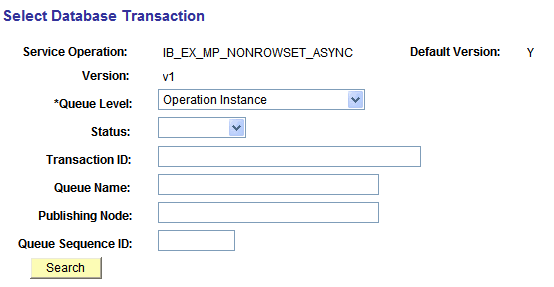
To populate message data using transaction data from the application database, you use the Select Database Transaction page (IB_EVENTSEARCH_SEC).
This example illustrates the fields and controls on the Select Database Transaction page.
To use operation transaction data from a transaction:
-
From the Handler Tester page (
The Select Database Transaction page appears.
-
From the Handler Type drop-down list, select a handler type.
-
From the Handler Name drop-down list, select a handler.
-
In the Populate Input Message section, click the Use DB Transaction button.
The Select Database Transaction page appears.
-
From the Queue Level drop-down list select where the XML to use in the test is located. The options are:
-
Operation Instance
-
Publication Contract
-
Subscription Contract
-
-
From the Statusdrop-down list select the status. The options are:
-
Cancelled
-
Edited
-
Error
-
New
-
Retry
-
Timeout
-
-
(Optional.) In the Queue Name field, enter the name of the queue.
-
(Optional.) In the Publishing Node field, enter the name of the publishing node.
-
(Optional.) In the Queue Sequence ID field, enter the sequence ID.
-
Click the Search button to view the available transactions.
-
Click the Actionslink for the transaction to use.
If this is a rowset-based message, the message tree will be populated from the transaction you selected. If this is a non rowset-based message, the XML will be populated.