Adding Data Structures for Nonrowset-Based Messages
This section discusses how to:
-
Build data structures for nonrowset-based data structures.
-
Insert nonrowset-based messages in project definitions.
Building Nonrowset-Based Data Structures
The Bulk Load Handler details page provides a data tree, similar to that found in the Messages component, that you use to build the structure of the nonrowset-based message.
You must define a minimum of one record to save the handler definition.
For building the data structure you use the same graphical user interface and procedures that you would for managing rowset-based messages in the Messages component.
By clicking the Add Record to Root link you can begin to create the data structure by adding a root record. As with the Messages component, you can select to include or exclude fields and specify field aliases. One unique difference here, however, is that you can build structures with multiple level 0 records. At save time, the system builds a message for each level 0 record found in the structure.
Note that message references are not allowed.
Message structures you create on the Bulk Load Handler details page are not accessible in the Messages component and appear only as part of the bulk load handler.
The message names start with ~IB_M_DMS~.
See the documentation elsewhere in the product documentation for managing rowset-based messages for creating the data structure. Again, even though here you are building the structure of a nonrowset-based message, you will use the same graphical user interface and procedures as those for working with rowset-based messages.
Inserting Nonrowset–Based Messages in Project Definitions
You must assign nonrowset-based messages you create using the Bulk Load Handler page to a bulk load handler. To accomplish this task, in PeopleSoft Application Designer when you insert a service operation handler definition into a project, you must include the message(s) as a related definition.
This example illustrates the Insert into Project page.
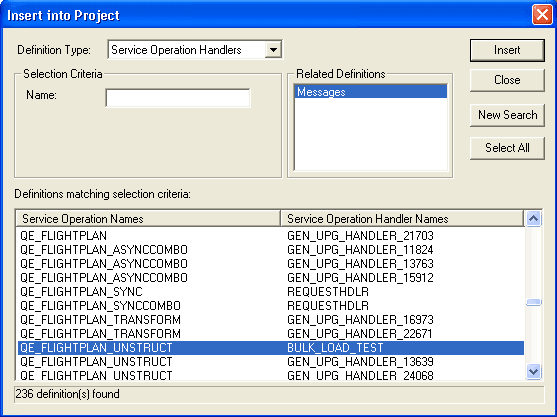
To insert a service operation handler definition and related message definitions into a project:
-
In PeopleSoft Application Designer, from the Insert menu, select Definitions info Project.
The Insert into Project page appears.
-
From the Definition Type drop-down list box, select Service Operation Handlers.
-
Click Insert to view all service operation definitions and handlers in the system.
-
Click the name of the service operation and handler to insert into the project.
-
In the Related Definition section, click Messages.
-
Click the Insert button to insert the service operation, handler, and related messages into the project.