Adding a Handler to a Service Operation
To add a handler to a service operation use the Service Operations – Handlers page (IB_SERVICEHDLR).
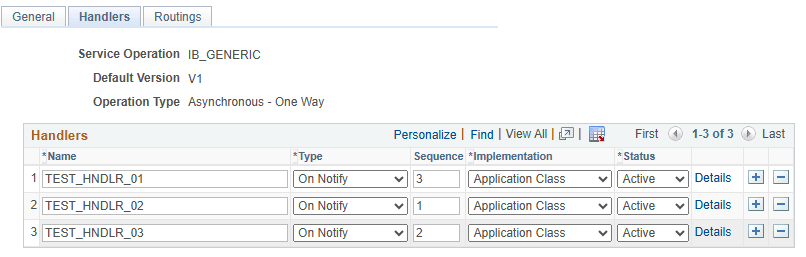
This example illustrates the Service Operations – Handlers page.
To create a handler definition:
-
Access the Service Operations–Handlers page ( and click the Handlers tab).
-
In the Handlers section, enter a handler name in the Name field.
Note that for OnRequest, and OnRoute handlers, you need not enter a name. The system adds a handler name after you provide the handler details.
-
From the Type drop-down list box, select the handler type.
The service operation type determines the handler types that are available to choose.
See Handler Types and Messaging Types.
The valid values are:
-
In the Sequence field, enter a number to specify the order of processing for the handler.
The Sequence field appears only when there are multiple notification handlers defined and active for the service operation.
-
From the Implementation drop-down list box, select the method to use to implement the handler.
The handler type determines the available implementation methods.
-
From the Status drop-down list box, select a status for the handler.
Values are:
-
Active. (Default.) Select to make the handler active.
-
Inactive. Select to make the handler inactive.
-
-
Click the Save button.
Repeat these steps to add additional handlers to the service operation.