Adding REST Service Definitions
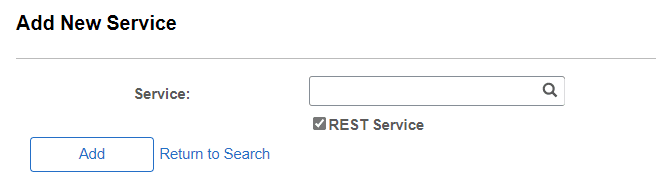
To add a REST service definition to the system, use the Add New Service page (IB_SERVICE_ADD). To access this page, select , then select the Add a New Value link.
This example illustrates the Add New Service page.
Note:
Before you can add a service, you must configure PeopleSoft Integration Broker to handle services using the Service Configuration page.
Important:
To create a REST service you must select the REST Service option when you add the service.
Enter a Service name in the Service field and click Save.
For restrictions on naming services, see Understanding Naming Services and Service Aliases for REST Service Definitions
After you add a service definition to the system, the Services page (IB_SERVICEDEFN) appears that you use to configure the service definition.
This example illustrates the Services page with the fields completed.
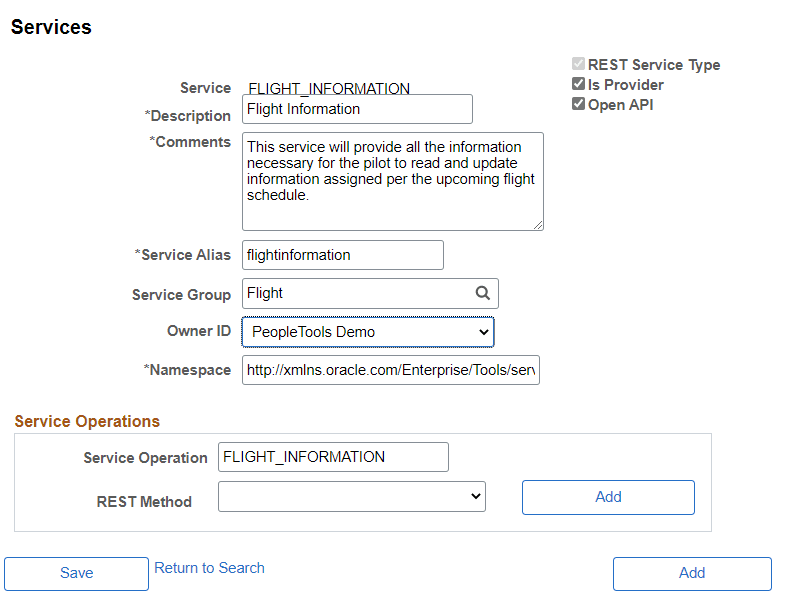
Enter the required fields and save the service.
| Field or Control | Description |
|---|---|
|
Is Provider |
By default the Is Provider check box is selected. Clear this check box for a Consumer service. |
|
Open API |
Select this check box to indicate that the Service will comply with Oracle REST Standards and generate an Open API. |
|
Service Alias |
The Service Alias name must meet Oracle REST compliant naming standard. In addition a check will be made to determine if the Service Alias is unique within the Integration Broker Service Metadata. |
|
Service Group |
Optionally select a Service Group that this Service should belong to or create a new Service Group. |
|
Namespace |
The default value is the namespace that is declared in the Service Namespace field on the Service Configuration page. |