Adding Service Definitions
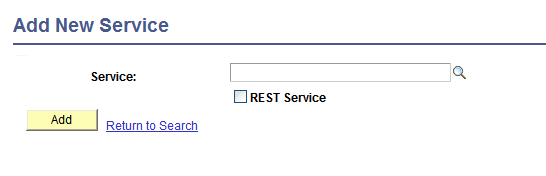
To add a service definition to the system, use the Add a New Value link on the Services search page. To access this page, select . Then select the Add a New Value link.
This example shows the Add New Service page.
Note:
Before you can add a service, you must configure PeopleSoft Integration Broker to handle services using the Service Configuration page.
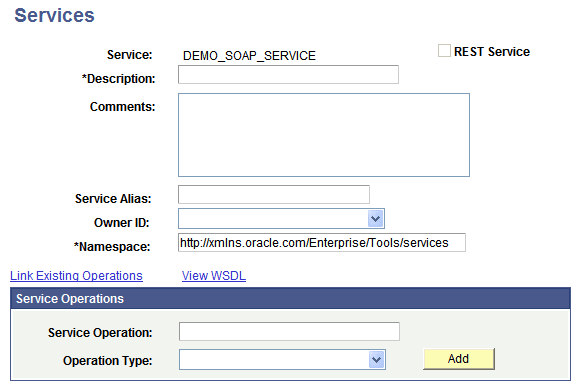
After you add a service definition to the system, the Services page (IB_SERVICEDEFN) appears where provide additional service definition information.
This example illustrates the Services page. The example shows the definition for a non-REST service called DEMO_SOAP_SERVICE.
To add a service definition:
-
Access the Services page ().
-
Click the Add a New Value link.
-
In the Service field, enter a name for the service.
Restrictions for naming services are discussed elsewhere in this section.
-
Click the Add button.
The Services page appears.
-
In the Description field, enter a description for the service.
-
(Optional.) If the service is REST-based, select the Is Provider check box to define the service as a provider service.
By default, when you add a REST-based service to the system it is a provider service.
-
(Optional.) In the Comments field, enter comments about the service or the service.
-
(Optional.) In the Service Alias field, enter an alias name for the service.
Restrictions for naming service aliases are discussed elsewhere in this section.
-
(Optional.) From the Object Owner ID drop-down list box, select the owner of the service.
-
In the Namespace field, enter a namespace URI for the service.
The default value is the namespace that is declared in the Service Namespace field on the Service Configuration page.
-
Click the Save button.
Related Topics