Cleaning Up Chatbots
Clean up is required in the following scenario:
-
Customer performs a tools only upgrade to PeopleTools 8.59.
-
Customer updates the old Chatbot Application Service.
-
PeopleSoft delivers an Application Service update that includes the same Application Service where the metadata has been modified to be compliant with Oracle standards.
In this case some of the old Chatbot Services are merged into a single Application Service.
-
When the customer takes the Application upgrade, both the updated Application Services as well as the original Application Services exist in the database.
-
The customer upgraded Application Services is then orphaned as they can not be called from Oracle Digital Assistant (ODA).
This example illustrates the fields and controls on the Clean Up page where there are 2 orphaned Application Services.
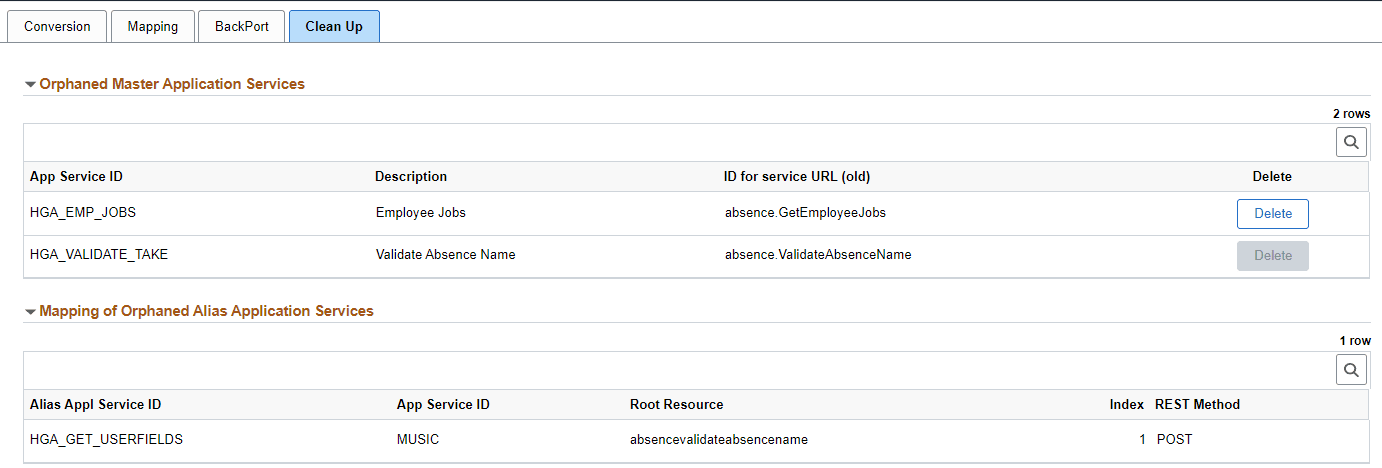
If the orphaned Application Service has an associated orphaned Alias, the Delete button is disabled. In this case it is necessary to create a new Alias Application Service and add the necessary root resources to override the primary root resources before you can delete the orphaned alias Application Service using the Delete Application Service page.
Use the Delete button to remove any Application Services from the new data model that are considered Orphaned Services.