Excluding Fields from Messages
You can exclude record fields from inclusion in a rowset-based message definition using the Message Field Properties page.
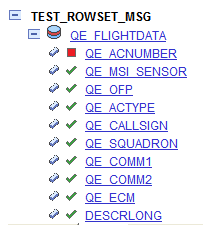
After you exclude fields from records, the tree view of the message definition on the Message Definitions page displays a red icon in the shape of box next to the excluded fields.
This example illustrates a partial view of the Message Field Properties page. The example shows that the field QE_ACNUMBER has been excluded from the QE_FLIGHTDATA record.
To exclude fields:
-
Access the Message Field Properties page.
-
Select . The Messages-Message Definitions page appears.
-
Click the Expand button (+) to expand the record tree structure, and locate the field to exclude from the definition.
-
Click the name of the field to exclude.
The Message Field Properties page appears.
-
-
Click the name of the field to exclude.
-
Deselect the Include check box.
-
Click the OK button.
The Messages-Message Definitions page appears.
-
Click the Save button.