Generating REST Services and Service Operations from Component Interface Methods
Use the Confirm Actions page (IB_CISERVICES_SEC) to confirm the component interface and select actions to use for generating REST service operations.
This example illustrates the fields and controls on the Confirm Actions page. You can find definitions for the fields and controls later on this page.
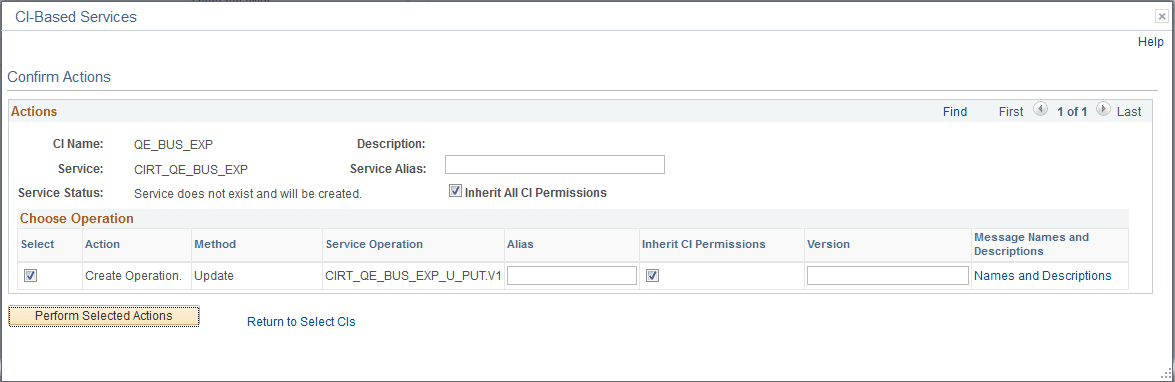
You can work with the following page elements:
| Field or Control | Description |
|---|---|
|
Service Alias |
(Optional.) Enter an alias name for the service. The name you enter can be lower or mixed-case. If specified, this is the service name that appears in all WSDL documents you generate. |
|
Inherit All CI Permissions |
Select the check box so that all service operations you create inherit the security permissions as defined for the component interface after which they are based. By default the check box is selected. To inherit security permissions for specific service operations only, use the Inherit CI Permission check box in the Choose Operation grid. See Inheriting Component Interface Security Permission Lists. |
|
Select |
(Optional.) Deselect the check box to omit creating a service operation for a method. |
|
Alias (Service Operation) |
(Optional.) Enter an alias name for the service operation. The name you enter can be lower or mixed-case. If specified, this is the service operation name that appears in any WSDL documents you generate. |
|
Inherit CI Permissions |
Select the check box for a service operation to inherit the security permissions as defined for the component interface after which it is based. By default the check box is selected for all service operations based off of a component interface. Deselect the check box for each service operation you do not want to inherit the permissions defined for the component interface after which it is based. See Inheriting Component Interface Security Permission Lists. |
|
Version |
(Optional.) Service operations created default version V1. You may enter a different value to use as the version when the service operation is created. This field is a text field, so you may enter numeric or text values. |
|
Message Names and Descriptions |
(Optional.) Click the link to specify names and descriptions for messages in the service operation. The message names and descriptions will appear in the generated XML message schema. If you do not enter message names or descriptions, PeopleSoft Integration Broker assigns system-generated names to the messages. The following example shows a sample system-generated message name: M702221.V1 |
|
Perform Selected Action |
Click the button to generate REST services and service operations for the component interface and selected methods. After the REST service and service operations are created, the Review Status page displays and you can review the actions performed as well as access the REST service definition created. |
|
Return to Select CIs |
Click the link to return to the previous page, the Review Status page. |