Step 2: Select Service Operations
Use the Select Service Operations page (IB_WSDL_EXP_OPER) of the Provide Web Service Wizard to select service operations to provide.
This example illustrates the Select Service Operations page for a non-REST service.
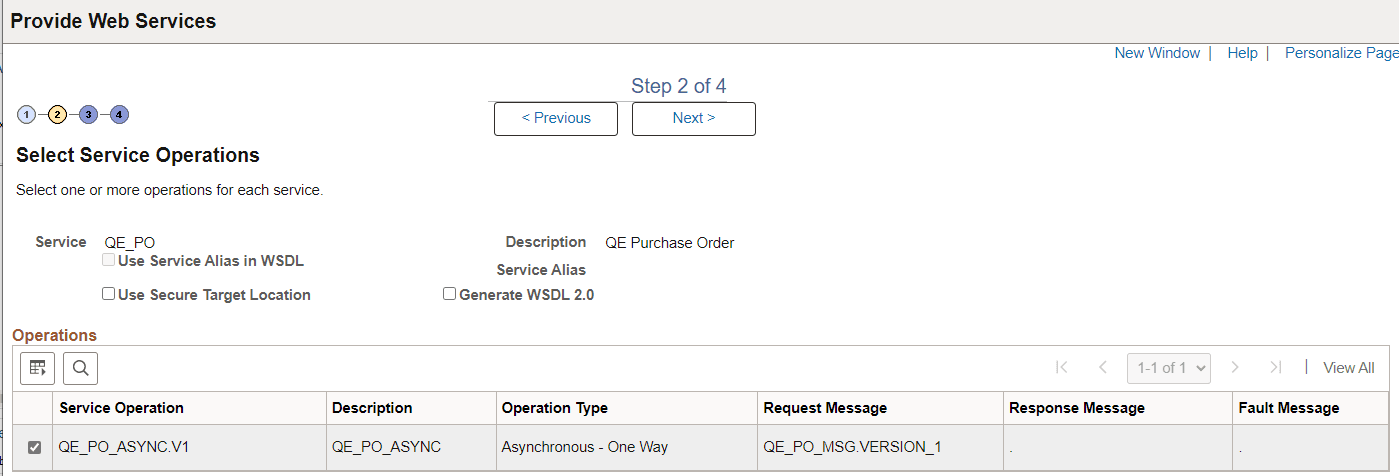
| Field or Control | Description |
|---|---|
|
Use Service Alias in WSDL |
Select this checkbox to specify that the system use the service alias name in the generated WSDL, rather than the actual service name. |
|
Use Secure Target Location |
Select this checkbox if you want to export the WSDL to the URL specified in the Secure Target Location field on the Service Configuration page. If you do not select this option, WSDL is exported to the URL specified in the Target Location field defined on the Service Configuration page. |
|
Generate WSDL 2.0 |
By default, the system generates WSDL in WSDL 1.1 format. Select this checkbox to generate WSDL in WSDL 2.0 format. |
If you are attempting to provide a different version of an existing WSDL document, the Service System Status mode set, Production or Development, may impact your results.
See WSDL Document and WADL Document Versioning.
Click the Next button to proceed to the next step in the wizard.