Understanding This Scenario
In this scenario a PeopleSoft Human Resources system is integrating with a PeopleSoft Customer Relationship Management system on PeopleTools. Both systems are on the same PeopleTools release.
Use a remote gateway configuration when connections with an integration participant are not possible through the internet. This type of implementation enables you to communicate with wide area networks (WANs) and local area networks (LANs) where a firewall is present.
This diagram shows the configuration of PeopleSoft Integration Broker components for integrations with other PeopleSoft Integration Broker systems by using firewall.
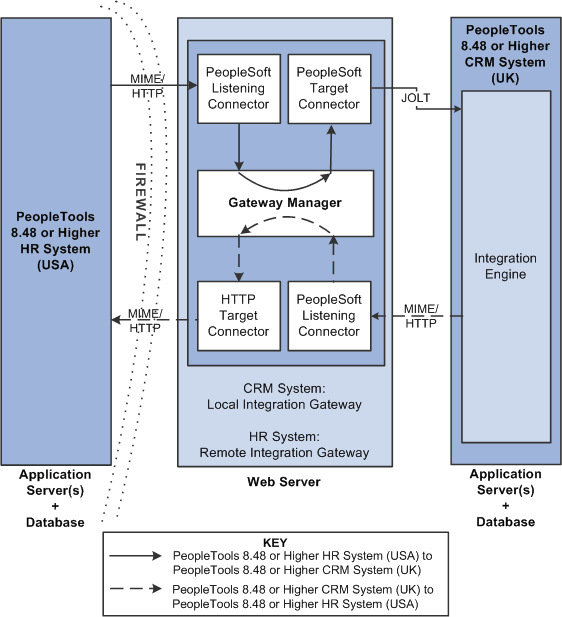
For this configuration scenario, one PeopleSoft application and one integration gateway reside on each side of the firewall. The integration gateway can reside on the same physical machine on which you have installed the PeopleSoft application, or it can reside on its own machine.
In this configuration scenario, PeopleSoft Integration Broker uses the default remote gateway connector, the HTTP target connector, on the local gateway to send messages to the PeopleSoft listening connector on the remote gateway. Routing all messages through the local gateway enables each PeopleSoft Integration Broker system to keep its own centralized log of all integration messages.
Because this example shows two-way communication and assumes that the same service operation is being exchanged, the PeopleSoft Human Resources (USA) system and the PeopleSoft CRM (UK) system are source systems when they send messages, and they're destination systems when they receive messages.
Keep in mind the following as you review these configuration tasks:
-
You should use a single integration gateway for all applications that reside on the same side of a firewall.
-
The local integration gateway for one application is the remote integration gateway for the other application.