Using the FTP Attachment Utility
Use the FTP Attachment Upload page in the Files Utilities component (IB_FILEUPLOAD) to upload files to your FTP server for attaching to service operations.
To access the FTP Attachment Upload page, select
This example illustrates the fields and controls on the FTP Attachment Upload page. You can find definitions for the fields and controls later on this page.
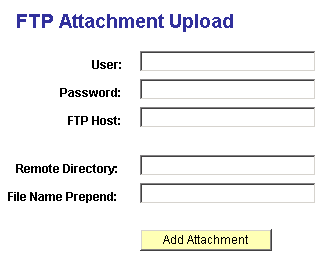
You work with the following page elements:
| Field or Control | Description |
|---|---|
|
User |
Indicates the user ID of the FTP server. |
|
Password |
Indicates the password to the FTP server. |
|
FTP Host |
Indicates the machine name of the FTP server. |
|
Remote Directory |
Indicates the directory path to the file to upload. |
|
File Name Prepend |
Enter text to prepend the file name to build the final file name to copy to the target directory. |
|
Add Attachment |
Click to upload the indicated file. |