Using the Queue Prioritization Page
Use the Queue Prioritization page to prioritize queues to ensure that higher, time-sensitive transactions are processed first.
To access the Queue Prioritization page, select .
This example illustrates the fields and controls on the Queue Prioritization page. You can find definitions for the fields and controls later on this page.
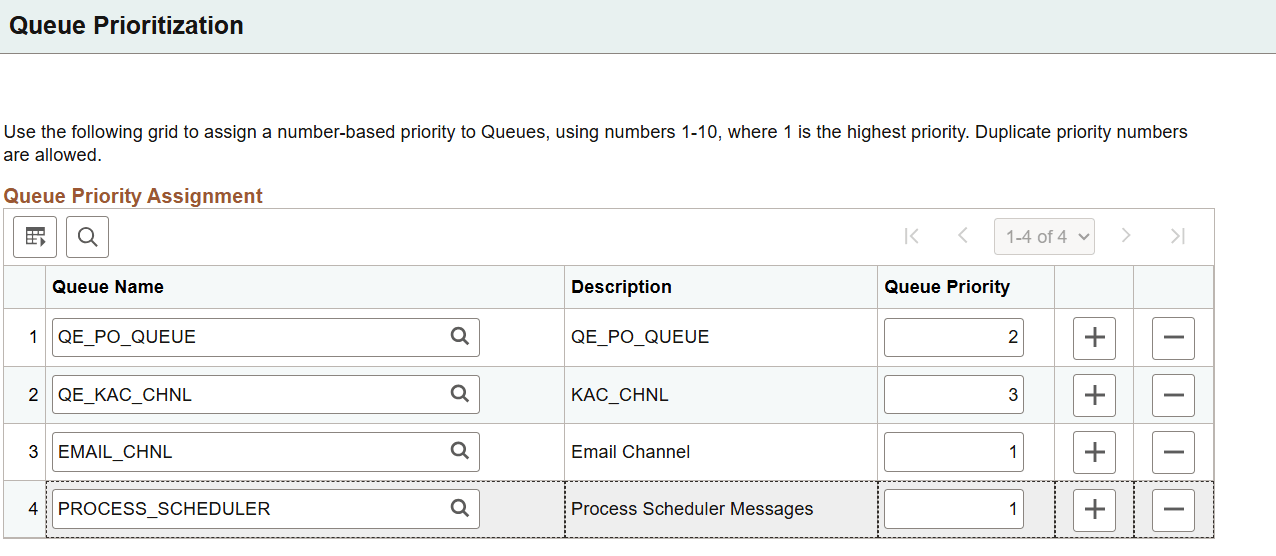
| Field or Control | Description |
|---|---|
|
Queue Name |
Enter the queue definition or click the lookup button to search for and select the queue. |
|
Description |
Displays the description for the queue. |
|
Queue Priority |
Enter a numbers between 1 and 10 to assign a number-based priority to the queue, where 1 is the highest priority. Duplicate priority numbers are allowed. |