Defining ADS Project
To define a new project:
-
The initial state is New Project. Add a description and comments.
-
Select a data set.
-
When you tab off the data set name, the Insert Data Set Content page is displayed for that data set.
-
Select the data set content.
-
Save the project. The new status is Created.
-
Additional data sets can be added to the project.
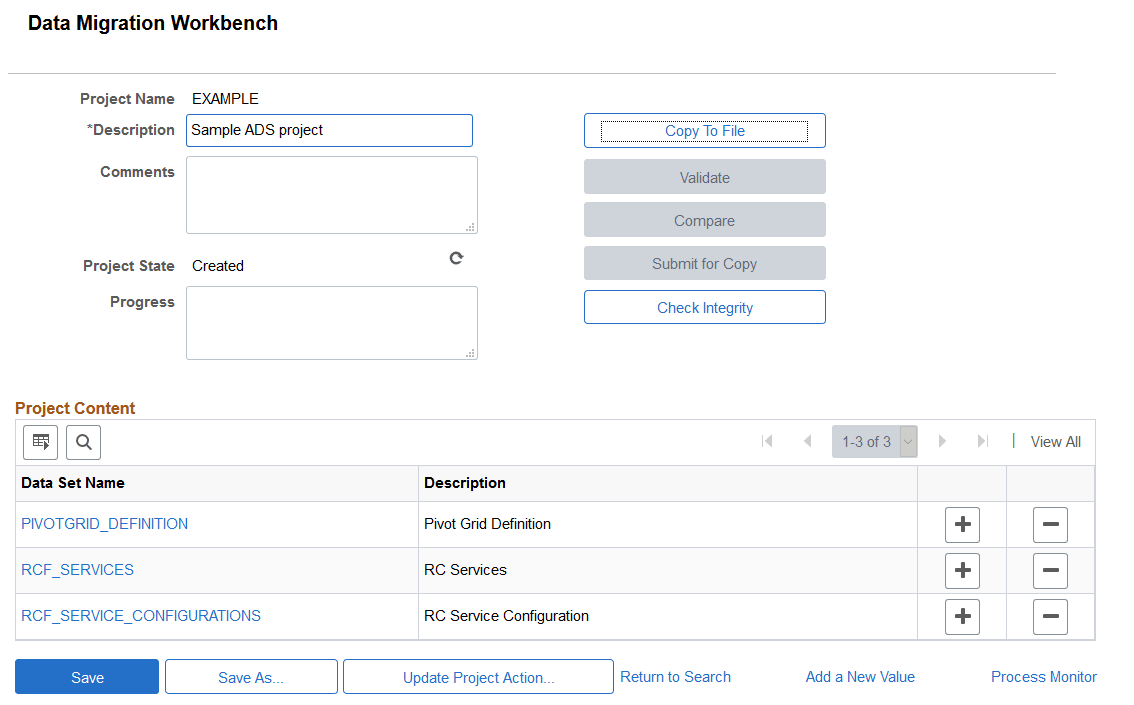
Use the Project Definition page to define the ADS project.
Navigation:
This example illustrates the fields and controls on the Project Definition page. You can find definitions for the fields and controls later on this page.
| Field or Control | Description |
|---|---|
|
Description |
Enter a description for the project. The description should include information about the project. |
|
Comments |
Optionally you can add comments to the project. |
|
Project State |
Display only field that shows the current state of the project. You can use the Refresh button to obtain the most recent state. Progress state on the source will show:
Progress state on the target will show:
Validation errors, if any, are also shown. |
|
Progress |
Display only field that shows the progress of the project copy or compare. |
|
Data Set Name |
Select one or more existing data sets from the lookup. Look up will show all the existing data sets that have Is Copyable selected in the data set definition. |
|
Content Description |
This is description associated with the data set content. |
|
Add a new row (+) |
Click to add another data set to the project. |
|
Delete a row (-) |
Click to delete a data set from the project. |
Note:
ADS projects are not shown in Application Designer project search and cannot be opened in Application Designer.